185 lines
20 KiB
Markdown
185 lines
20 KiB
Markdown
<h1 align="center">dsh-mnemon</h1>
|
||
|
||
<p align="center"><a href="https://github.com/omdsh-dev/dsh-mnemon/blob/main/README.md">English</a> · <strong>简体中文</strong></p>
|
||
|
||
<p align="center">
|
||
<a href="https://www.npmjs.com/package/dsh-mnemon"><img alt="npm 版本" src="https://img.shields.io/npm/v/dsh-mnemon?label=npm" /></a>
|
||
<a href="https://www.npmjs.com/package/dsh-mnemon"><img alt="npm 累计下载量" src="https://img.shields.io/npm/dt/dsh-mnemon?label=%E7%B4%AF%E8%AE%A1%E4%B8%8B%E8%BD%BD" /></a>
|
||
<a href="https://github.com/omdsh-dev/dsh-mnemon/releases/latest"><img alt="GitHub 发布版本" src="https://img.shields.io/github/v/release/omdsh-dev/dsh-mnemon" /></a>
|
||
<a href="https://github.com/omdsh-dev/dsh-mnemon"><img alt="GitHub 收藏数" src="https://img.shields.io/github/stars/omdsh-dev/dsh-mnemon?label=stars" /></a>
|
||
<a href="https://github.com/omdsh-dev/dsh-mnemon/blob/main/LICENSE"><img alt="MIT 许可证" src="https://img.shields.io/badge/License-MIT-yellow.svg" /></a>
|
||
<a href="https://dshfind.com/zh/plugins/omdsh-dev/dsh-mnemon?ref=badge"><img alt="dshfind" src="https://dshfind.com/api/badge/omdsh-dev/dsh-mnemon?lang=zh" /></a>
|
||
<a href="https://dshfind.com/zh/plugins/omdsh-dev/dsh-mnemon?ref=badge"><img alt="dshfind 下载量" src="https://dshfind.com/api/badge/omdsh-dev/dsh-mnemon?metric=downloads&lang=zh" /></a>
|
||
</p>
|
||
|
||
|
||
<p align="center"><strong>面向 DeepSeek Harness 的可组合视图上下文。</strong></p>
|
||
<p align="center">来源与策略可插拔,开箱即用提供分层记忆与自进化技能。</p>
|
||
|
||
<p align="center">
|
||
<a href="https://github.com/omdsh-dev/dsh-mnemon/blob/main/docs/zh-CN/guides/ui-guide.md#在对话中">
|
||
<img src="https://raw.githubusercontent.com/omdsh-dev/dsh-mnemon/main/docs/assets/webui/zh-CN/recall.gif" alt="提问后,回答用到工作记忆、项目档案与记忆空间;展开回合记忆栏,点击读到的档案,直接在项目档案中打开它" width="880" />
|
||
</a>
|
||
</p>
|
||
|
||
<p align="center">
|
||
<a href="https://github.com/omdsh-dev/dsh-mnemon/blob/main/docs/zh-CN/guides/installation.md"><strong>安装与启动</strong></a> ·
|
||
<a href="https://github.com/omdsh-dev/dsh-mnemon/blob/main/docs/assets/webui/README.md">观看演示</a> ·
|
||
<a href="https://github.com/omdsh-dev/dsh-mnemon/blob/main/docs/zh-CN/README.md">文档中心</a> ·
|
||
<a href="https://github.com/omdsh-dev/dsh-mnemon/blob/main/docs/zh-CN/development/extensions.md">制作插件</a>
|
||
</p>
|
||
|
||
## 为什么需要 dsh-mnemon
|
||
|
||
每次会话都从零开始的 Agent,会反复询问你早已说过的事情;把所有内容塞进同一个记忆库也不行,要么每轮都被淹没,要么漏掉真正要紧的信息。dsh-mnemon 为 DeepSeek Harness 提供分层、可见、可组合的记忆,以及越用越好的技能。
|
||
|
||
- **每一轮都拿到合适的记忆。** 偏好和工作中的事实常驻上下文;项目档案与长期证据只在问题需要时才检索。
|
||
- **看得见这一轮用了什么。** 每条回复下方的回合记忆栏列出这一轮读到和写入的档案与记忆,点一下就在记忆系统中打开它;记忆系统展示全部已保存的内容,并可直接编辑。
|
||
- **一键存入记忆。** 对话里出现值得保留的事实,点击回复下的脑形图标,由任务 Agent 去重、提炼并写入合适的记忆空间,也可以直接存到你选择的位置:工作记忆、用户画像或某个记忆空间。回执写明存到了哪里。
|
||
- **越用越好的技能。** 技能管理把 DSH 的技能集中到一处:它能复盘你的真实对话,写出更好的 `SKILL.md`,先回测再交给你采纳;还能从 skills.sh、GitHub 和发布 Agent Skills 的网站安装更多技能。
|
||
- **在插件页组合。** 选择一个主策略和若干可选增强,切换时无需迁移任何数据;每个组件都有自己的设置页。
|
||
- **数据放在你想放的地方。** 默认由 Mnemon Native 在本地保存,也可以接入八种第三方 Provider;存储范围可选全局、按工作区、集中存储或你指定的目录,并支持 ZIP 备份。
|
||
- **可以扩展。** Source 与 Strategy 都是基于公开 SDK 的普通 DSH 插件;安装的组件与随附组件拥有同样的页面和开关。
|
||
|
||
## 看看实际效果
|
||
|
||
以下录屏来自真实 WebUI,由真实的 DeepSeek 模型作答,项目是预置的虚构项目 Lumen;等待模型的片段加速播放,画面右下角有标记。
|
||
|
||
**把新事实存进记忆。** 回复中出现了新的测量结果:点击回复下的脑形图标,把候选内容改成要记住的那一句,交给任务 Agent;回执写明存进了哪个记忆空间,一键即可查看。
|
||
|
||
<p align="center">
|
||
<a href="https://github.com/omdsh-dev/dsh-mnemon/blob/main/docs/zh-CN/guides/ui-guide.md#存入记忆"><img src="https://raw.githubusercontent.com/omdsh-dev/dsh-mnemon/main/docs/assets/webui/zh-CN/save.gif" alt="存入记忆:编辑候选内容,查看可以存到哪里并保留“由 Agent 决定”,交给任务 Agent,收到已存入的回执后在记忆空间中查看新记忆" width="880" /></a>
|
||
</p>
|
||
|
||
**在一处查看全部记忆。** 状态、运行时记忆、项目档案与记忆空间集中在记忆系统中;图谱按实体把记忆连接起来,Agent 查询给出按内容引用记忆的回答。
|
||
|
||
<p align="center">
|
||
<a href="https://github.com/omdsh-dev/dsh-mnemon/blob/main/docs/zh-CN/guides/ui-guide.md#记忆系统"><img src="https://raw.githubusercontent.com/omdsh-dev/dsh-mnemon/main/docs/assets/webui/zh-CN/memory.gif" alt="记忆系统:依次查看状态、运行时记忆、项目档案、记忆空间图谱,再用 Agent 查询得到带引用的回答" width="880" /></a>
|
||
</p>
|
||
|
||
**在插件页组合记忆。** 一个主策略、它的记忆来源与可选增强,每个开关即时生效;每个组件都有自己的页面,存储、备份与界面设置也在这里。
|
||
|
||
<p align="center">
|
||
<a href="https://github.com/omdsh-dev/dsh-mnemon/blob/main/docs/zh-CN/guides/ui-guide.md#在插件页中"><img src="https://raw.githubusercontent.com/omdsh-dev/dsh-mnemon/main/docs/assets/webui/zh-CN/plugins.gif" alt="DSH 的插件页,再进入可组合记忆的页面:记忆组合、主策略菜单、分层策略与记忆空间的组件页,以及存储与界面" width="880" /></a>
|
||
</p>
|
||
|
||
更多画面与每一步的说明见[界面指南](https://github.com/omdsh-dev/dsh-mnemon/blob/main/docs/zh-CN/guides/ui-guide.md),全部截图与录屏见 [WebUI 图集](https://github.com/omdsh-dev/dsh-mnemon/blob/main/docs/assets/webui/README.md)。
|
||
|
||
## 三类记忆
|
||
|
||
| 记忆 | 适合保存 | 如何进入 Agent 上下文 |
|
||
|---|---|---|
|
||
| **运行时记忆** | 偏好、协作约定、下一轮就需要的事实 | 每轮以紧凑的 USER.md 与 MEMORY.md 注入 |
|
||
| **项目档案** | 设计、调查、流程与交接材料 | 先检索,相关时再阅读全文 |
|
||
| **记忆空间** | 长期事实、决策、实体及其关系 | 按需从已启用的 Provider 召回 |
|
||
|
||
默认的**分层策略**让运行时记忆常驻,另外两类按需读取;**通用策略**在同一份预算内提供全部可用来源,由模型决定如何使用。**记忆空间**是由 Provider 承载、可以独立命名和激活的长期证据范围,英文界面称 memory space。
|
||
|
||
## 越用越好的技能
|
||
|
||
**技能管理**是一个实验性组件,用来管理 DSH 从项目和用户目录加载的 `SKILL.md` 技能。它的页面在记忆系统里,也可以作为独立的侧边栏入口。
|
||
|
||
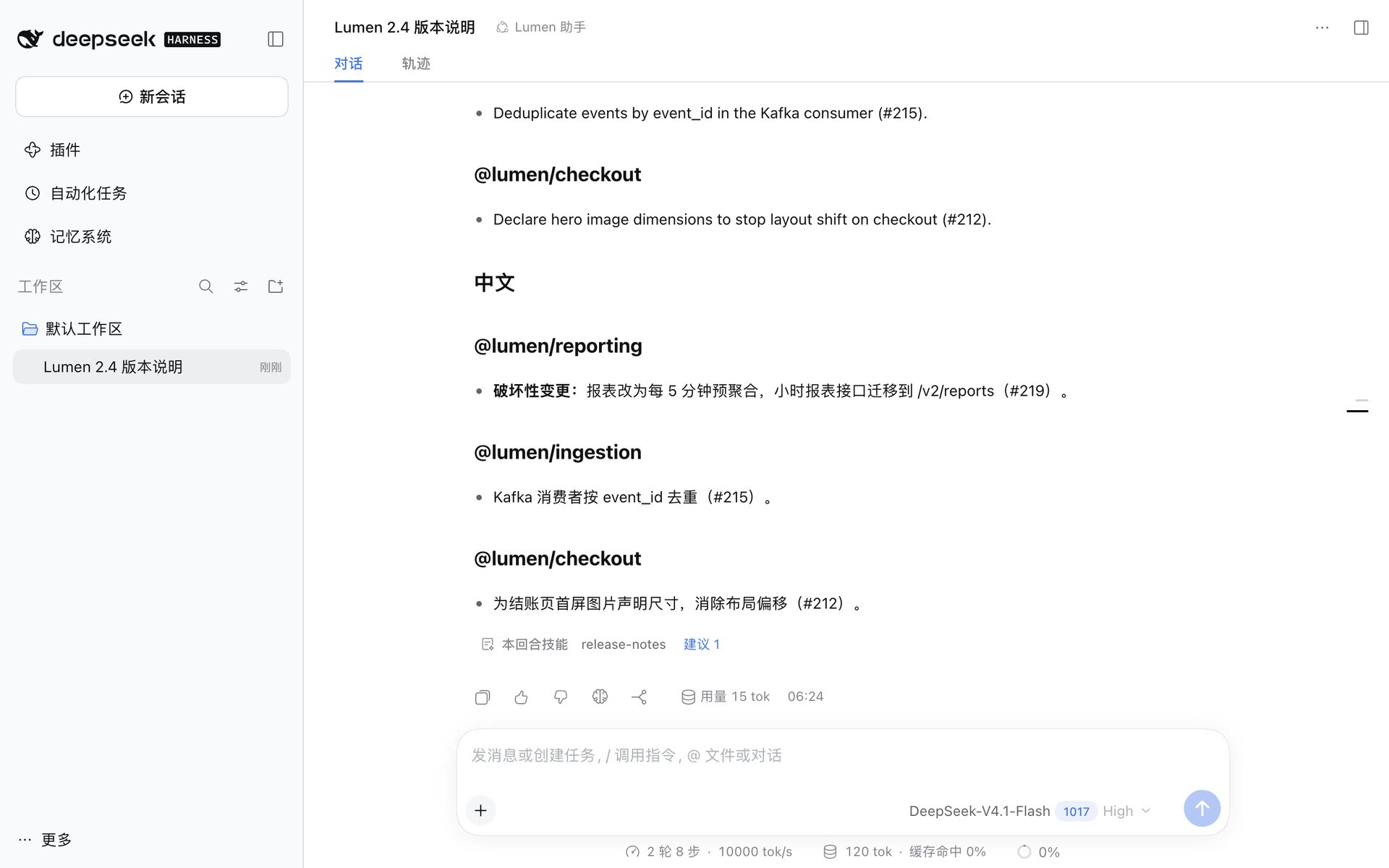
| 回合复盘提出改进 | 回测之后由你采纳 |
|
||
|---|---|
|
||
| [](https://github.com/omdsh-dev/dsh-mnemon/blob/main/docs/zh-CN/guides/skills.md#对话中) | [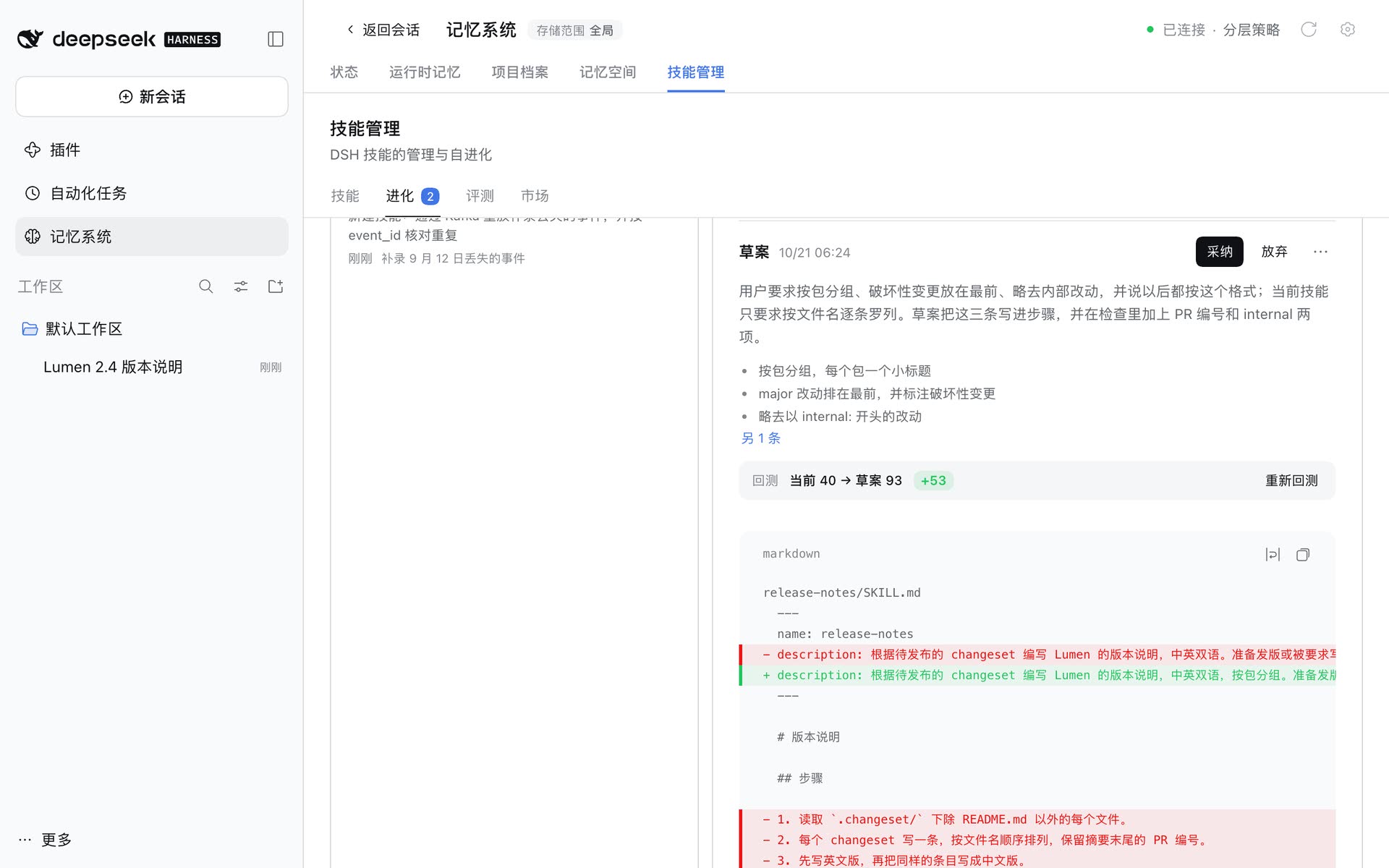](https://github.com/omdsh-dev/dsh-mnemon/blob/main/docs/zh-CN/guides/skills.md#进化) |
|
||
|
||
- **管理。** 让技能不被模型加载或不出现在 `/` 菜单里,一键在对话中使用,直接编辑,并能回到任意历史版本。
|
||
- **进化。** 开启自进化后,对话结束会在后台复盘,寻找多次纠正、“以后都这样做”的指示、工具失败和可复用的流程。每条建议都标出所依据的步骤;任务 Agent 写出新的 `SKILL.md`,先与当前版本回测对比,再由你采纳。默认仍须手动**采纳**;可显式开启自动采纳,让新的空闲审查建议在完整回测不退步时落地。
|
||
- **测试。** 每个技能都有自己的用例,来自复盘、记录的对话或手写,任意版本都能在这些用例上回测打分。
|
||
- **安装。** 市场可以搜索 skills.sh 的开放索引,读取任意 GitHub 仓库、任何按 Agent Skills 发现协议发布技能的网站,以及技能目录;每次安装前都能预览,有安全审核的会一并显示。
|
||
- **对话中。** 每个回合下方的一行列出这一回合用到的技能和复盘提出的建议,点一下就能打开。
|
||
|
||
自进化默认关闭,在**插件 → 可组合记忆 → 技能管理**中开启。[技能管理指南](https://github.com/omdsh-dev/dsh-mnemon/blob/main/docs/zh-CN/guides/skills.md)逐一介绍了每个页面。
|
||
|
||
## 快速开始
|
||
|
||
DSH 会自动加载包内的 `cordis.patch.yml`。不要再把其中的 `insert` 块复制到 Profile:重复的 Mnemon 条目会导致设置无法保存。已经复制过时,请参照[手动安装后的恢复步骤](docs/zh-CN/guides/installation.md#手动安装后设置无法保存)。
|
||
|
||
第一次使用 DSH?[安装与启动](https://github.com/omdsh-dev/dsh-mnemon/blob/main/docs/zh-CN/guides/installation.md)从一台空白电脑一直带你到第一条记忆,每一步都有截图。简要步骤如下,需要 [Node.js](https://nodejs.org/) 22.19 或更高:
|
||
|
||
```sh
|
||
npm install --global pnpm
|
||
npx @deepseek-ai/dsh web
|
||
```
|
||
|
||
<p align="center">
|
||
<a href="https://github.com/omdsh-dev/dsh-mnemon/blob/main/docs/zh-CN/guides/installation.md"><img src="https://raw.githubusercontent.com/omdsh-dev/dsh-mnemon/main/docs/assets/install/zh-CN/install.gif" alt="在插件页点击添加插件,输入 dsh-mnemon,安装后立即启用,侧栏出现记忆系统" width="880" /></a>
|
||
</p>
|
||
|
||
1. 在打开的页面中点击**插件 → 添加插件**,输入 `dsh-mnemon`,点击**安装**,再点击**立即启用**。
|
||
2. 在侧栏打开**记忆系统**,“状态”页列出每个记忆组件和 Provider。
|
||
3. 在对话中说一句需要记住的话。回复下方的回合记忆栏列出这一轮读到和写入的记忆,脑形图标可以把回复存入记忆。
|
||
4. 使用记忆空间时,可用 `npm install --global @mnemon-dev/mnemon` 安装 Mnemon Native 所需的 CLI,或在记忆空间页面启用其他 Provider。
|
||
5. 在**插件 → 可组合记忆**中选择主策略与增强。
|
||
|
||
dsh-mnemon 支持已发布的 DSH `0.2.2-rc.1`,同时保留对 `0.2.1` RC 系列和 `0.2.0-rc.2` 的支持。RC1 要求 Node.js >=24.9.0;旧版宿主遵循其各自的 Node.js 要求。同一个包也用于桌面版的插件页、命令行 `dsh plugin --profile web add dsh-mnemon`,以及 Headless:`dsh plugin --profile headless add dsh-mnemon`;更早的宿主请继续使用[兼容性与升级](https://github.com/omdsh-dev/dsh-mnemon/blob/main/docs/zh-CN/reference/compatibility.md)为其列出的版本。接下来可以看[入门指南](https://github.com/omdsh-dev/dsh-mnemon/blob/main/docs/zh-CN/guides/getting-started.md),已有安装的升级见[兼容性与升级](https://github.com/omdsh-dev/dsh-mnemon/blob/main/docs/zh-CN/reference/compatibility.md)。
|
||
|
||
## 工作原理
|
||
|
||
[](https://github.com/omdsh-dev/dsh-mnemon/blob/main/docs/zh-CN/development/architecture.md)
|
||
|
||
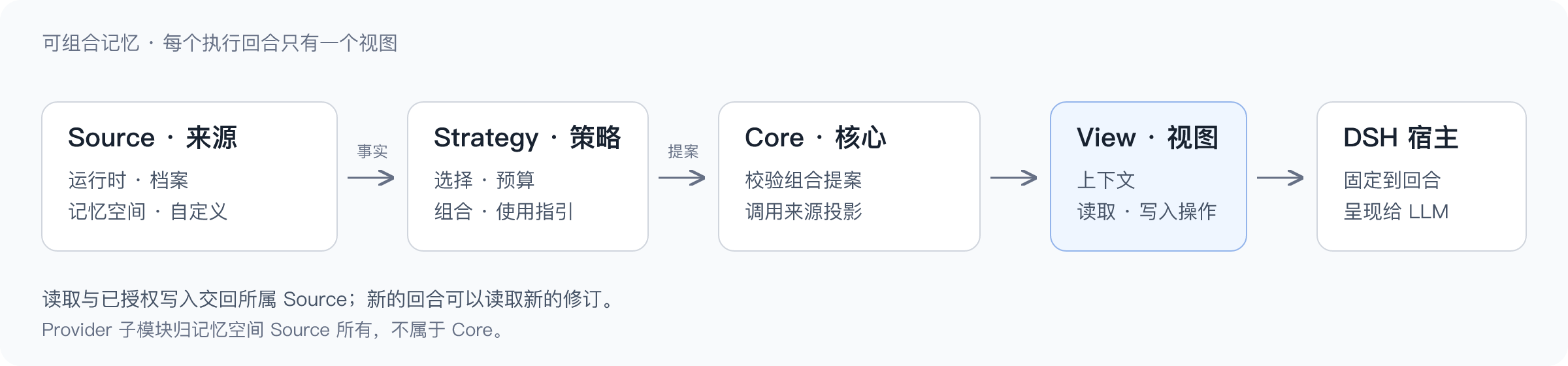
- **Source(记忆来源)** 拥有记忆及其操作:运行时记忆、项目档案和记忆空间,Provider 是记忆空间的子模块。
|
||
- **Strategy(策略)** 决定可用的 Source 如何参与一轮对话:哪些常驻、哪些可以检索、使用哪些工具和预算。增强通过标准插槽为它补充能力。
|
||
- **Core(核心)** 把结果校验为本轮唯一的不可变 **View(上下文视图)**,DSH 宿主将它固定到这一轮并控制工具访问。
|
||
|
||
随附插件与外部仓库使用同一套公开契约。[架构](https://github.com/omdsh-dev/dsh-mnemon/blob/main/docs/zh-CN/development/architecture.md)说明了归属关系、回合生命周期,以及组件可以贡献内容的界面区域。
|
||
|
||
## 官方插件
|
||
|
||
Starter 固定一组经过测试、各自独立版本的包。同一时间只运行一个主策略;增强在你打开之前保持关闭。
|
||
|
||
| 包 | 作用 | 默认 |
|
||
|---|---|---|
|
||
| [dsh-mnemon-source-runtime](https://github.com/omdsh-dev/dsh-mnemon/blob/main/plugins/dsh-mnemon-source-runtime/README.md) | 运行时记忆:USER.md、MEMORY.md、修订与本地存储 | 开启 |
|
||
| [dsh-mnemon-source-documents](https://github.com/omdsh-dev/dsh-mnemon/blob/main/plugins/dsh-mnemon-source-documents/README.md) | 项目档案:Markdown、检索、修订与归档 | 开启 |
|
||
| [dsh-mnemon-source-memory-spaces](https://github.com/omdsh-dev/dsh-mnemon/blob/main/plugins/dsh-mnemon-source-memory-spaces/README.md) | 记忆空间:长期证据及其 Provider | 开启 |
|
||
| [dsh-mnemon-source-skills](https://github.com/omdsh-dev/dsh-mnemon/blob/main/plugins/dsh-mnemon-source-skills/README.md) | 技能管理(实验性):DSH 技能的版本、来自真实对话的自进化、测试与回测,以及汇集 skills.sh、GitHub 与 Agent Skills 网站的市场 | 开启(自进化默认关闭) |
|
||
| [dsh-mnemon-strategy-default-three-tier](https://github.com/omdsh-dev/dsh-mnemon/blob/main/plugins/dsh-mnemon-strategy-default-three-tier/README.md) | 分层策略:运行时记忆常驻,其余按需读取 | 选中 |
|
||
| [dsh-mnemon-strategy-general](https://github.com/omdsh-dev/dsh-mnemon/blob/main/plugins/dsh-mnemon-strategy-general/README.md) | 通用策略:全部可用来源共享一份预算 | 关闭 |
|
||
| [dsh-mnemon-strategy-auto-capture](https://github.com/omdsh-dev/dsh-mnemon/blob/main/plugins/dsh-mnemon-strategy-auto-capture/README.md) | 主动记录:在回合中提示保留有用的事实 | 关闭 |
|
||
| [dsh-mnemon-strategy-light-context](https://github.com/omdsh-dev/dsh-mnemon/blob/main/plugins/dsh-mnemon-strategy-light-context/README.md) | 轻量上下文:为常驻内容设置共同上限 | 关闭 |
|
||
| [dsh-mnemon-strategy-scoped](https://github.com/omdsh-dev/dsh-mnemon/blob/main/plugins/dsh-mnemon-strategy-scoped/README.md) | 范围组合:按顺序选择来源,并限定可写子集 | 关闭 |
|
||
|
||
记忆空间 Provider:[Mnemon Native](https://github.com/omdsh-dev/dsh-mnemon/blob/main/plugins/dsh-mnemon-provider-mnemon-native/README.md)(默认,本地)· [OpenViking](https://github.com/omdsh-dev/dsh-mnemon/blob/main/plugins/dsh-mnemon-provider-openviking/README.md) · [Honcho](https://github.com/omdsh-dev/dsh-mnemon/blob/main/plugins/dsh-mnemon-provider-honcho/README.md) · [Mem0](https://github.com/omdsh-dev/dsh-mnemon/blob/main/plugins/dsh-mnemon-provider-mem0/README.md) · [Hindsight](https://github.com/omdsh-dev/dsh-mnemon/blob/main/plugins/dsh-mnemon-provider-hindsight/README.md) · [Holographic](https://github.com/omdsh-dev/dsh-mnemon/blob/main/plugins/dsh-mnemon-provider-holographic/README.md) · [RetainDB](https://github.com/omdsh-dev/dsh-mnemon/blob/main/plugins/dsh-mnemon-provider-retaindb/README.md) · [ByteRover](https://github.com/omdsh-dev/dsh-mnemon/blob/main/plugins/dsh-mnemon-provider-byterover/README.md) · [Supermemory](https://github.com/omdsh-dev/dsh-mnemon/blob/main/plugins/dsh-mnemon-provider-supermemory/README.md)。第三方 Provider 在配置前保持关闭;图谱、删除与枚举能力因后端而异。详见 [Provider 指南](https://github.com/omdsh-dev/dsh-mnemon/blob/main/docs/zh-CN/guides/memory-providers.md)。
|
||
|
||
## 自己动手扩展
|
||
|
||
用 `dsh-mnemon/extension-sdk` 定义 Source 或 Strategy,通过标准插槽编写增强,或用 `dsh-mnemon-source-memory-spaces/provider-sdk` 编写记忆空间驱动。组件还可以把自己的设置和状态卡片加入 dsh-mnemon 的页面。你的仓库自己负责清单、依赖、测试与构建;DSH 负责安装和挂载,是否把它选为主策略是另一个独立决定。
|
||
|
||
从[插件开发指南](https://github.com/omdsh-dev/dsh-mnemon/blob/main/docs/zh-CN/development/extensions.md)开始。新能力与新 Provider 请先在 Issue 中讨论,再提交 PR,详见 [CONTRIBUTING](https://github.com/omdsh-dev/dsh-mnemon/blob/main/CONTRIBUTING.zh-CN.md)。
|
||
|
||
## 数据与信任
|
||
|
||
- 运行时记忆与项目档案是本地文件,Mnemon Native 也在本地;第三方 Provider 使用各自的服务与作用域。
|
||
- 关闭组件不会删除其中的记忆,更换存储位置也不会搬移数据;需要迁移时使用 ZIP 备份。
|
||
- 技能管理的进化数据(建议、测试用例以及复盘读过的对话,机密已替换)保存在本地存储根目录,不在备份之内。来自市场的技能会被 Agent 按原文执行,安装前请先预览。
|
||
- Git 同步把同一份 Mnemon Pack 载荷以可读文件发布到你自己的仓库,另一台机器可以拉取;可以**立即同步**、在写入前**检查远端**,或按间隔**自动同步**。两台设备对同一主题写法不同时,两种写法都会保留,直到你接受并执行**记忆整理**给出的方案,见 [Git 仓库同步](https://github.com/omdsh-dev/dsh-mnemon/blob/main/docs/zh-CN/guides/operations.md#git-仓库同步)。
|
||
- 已保存的 Provider 凭据只留在宿主上,不会被导出;但备份仍包含私有记忆,请妥善保护。
|
||
- Source 与 Strategy 是受信任的进程内 JavaScript,**不是沙箱代码**;历史记忆永远不会凌驾于当前指令之上。
|
||
|
||
[备份与恢复](https://github.com/omdsh-dev/dsh-mnemon/blob/main/docs/zh-CN/guides/operations.md) · [安全策略](https://github.com/omdsh-dev/dsh-mnemon/blob/main/SECURITY.md) · [版本历史](https://github.com/omdsh-dev/dsh-mnemon/blob/main/docs/zh-CN/releases/README.md) · [路线图](https://github.com/omdsh-dev/dsh-mnemon/blob/main/docs/zh-CN/roadmap.md)
|
||
|
||
## 开发与验证
|
||
|
||
```sh
|
||
pnpm install --frozen-lockfile
|
||
pnpm verify
|
||
pnpm verify:plugins
|
||
```
|
||
|
||
需要 Node.js `^22.19.0 || >=24.0.0` 与 pnpm。`node scripts/serve-e2e.mjs` 会启动一个用后即弃的真实 WebUI;加上 `--docs-demo` 即可得到这些截图背后的示例项目,再加 `--live-model` 则由 DeepSeek API(读取 `DEEPSEEK_API_KEY`)真实作答。机制测试不代表模型准确率,也不代表云端 Provider 的实际表现。详见[开发与验证](https://github.com/omdsh-dev/dsh-mnemon/blob/main/docs/zh-CN/development/README.md)。
|
||
|
||
## Star 历史
|
||
|
||
<a href="https://www.star-history.com/?repos=omdsh-dev%2Fdsh-mnemon&type=timeline&legend=bottom-right">
|
||
<picture>
|
||
<source media="(prefers-color-scheme: dark)" srcset="https://api.star-history.com/chart?repos=omdsh-dev/dsh-mnemon&type=timeline&theme=dark&legend=bottom-right" />
|
||
<source media="(prefers-color-scheme: light)" srcset="https://api.star-history.com/chart?repos=omdsh-dev/dsh-mnemon&type=timeline&legend=bottom-right" />
|
||
<img alt="Star 历史图表" src="https://api.star-history.com/chart?repos=omdsh-dev/dsh-mnemon&type=timeline&legend=bottom-right" />
|
||
</picture>
|
||
</a>
|
||
|
||
## 许可证
|
||
|
||
[MIT](https://github.com/omdsh-dev/dsh-mnemon/blob/main/LICENSE)。第三方 Provider 适用各自的许可证与服务条款,见[第三方声明](https://github.com/omdsh-dev/dsh-mnemon/blob/main/THIRD_PARTY_NOTICES.md)。
|