34 KiB
Skills
简体中文 | English | Documentation
Skills is one place for the DSH skills a workspace can load. You can switch a skill off, use it in the conversation, edit it and go back to an earlier version. It can also improve skills from your real conversations, test every change before you adopt it, and install more skills from the places they are already published. Skills is experimental: it ships with dsh-mnemon and is on, but self-evolution stays off until you turn it on.
| Where | What you do there | How to open it |
|---|---|---|
| The Skills page | Manage skills, handle what self-evolution suggests, test skills, install more | Memory System → Skills, or its own sidebar entry |
| In a conversation | See which skills a turn used and what its review suggested | The Turn skills line under a finished turn |
| Settings | Configure self-evolution, its parameters, default models, skill directories, market sources, the conversation line and the sidebar entry | Plugins → dsh-mnemon → Skills, or the gear on the Skills page |
A skill is a folder with a SKILL.md, in the Agent Skills format DSH reads. The page never calls a model itself, and skills reach the model only through DSH's own skill tool: Skills never adds anything to a turn's memory View.
The screens below come from the v0.5.34 Skills gallery, captured on the fictional Lumen project: the assistant wrote release notes with the release-notes skill, the user corrected the format, and self-evolution took it from there.
Linked skill roots, bundle directories and SKILL.md files stay visible and usable, and are read-only by default. To optimize a trusted shared skill, enable Allow linked skill updates in Plugins → dsh-mnemon → Skills (skills.allowLinkedUpdates, default false). Editing, invocation changes, version restoration and draft adoption then update the resolved original file without replacing the link, affecting every Agent sharing it. Content hashes and confirmed management revisions still reject stale writes. Self-evolution and automatic adoption still require their separate switches. Turning this off blocks later linked updates and adoption again; existing changes and version history remain. New skill creation or installation into linked roots, and trash/removal rules, do not change. Ordinary local skills keep their workflow. Independent Skills Source instances can set their own allowLinkedUpdates option.
The Skills page
The page has five tabs: Skills, Evolution, Evals, Market and Trash. The count on Evolution is how many suggestions and drafts wait for you.
Skills
On wide screens, the skill list and the selected document scroll independently. Selecting another skill opens its detail at the top while keeping your place in the list. Narrow screens keep the scrollable list above the document.
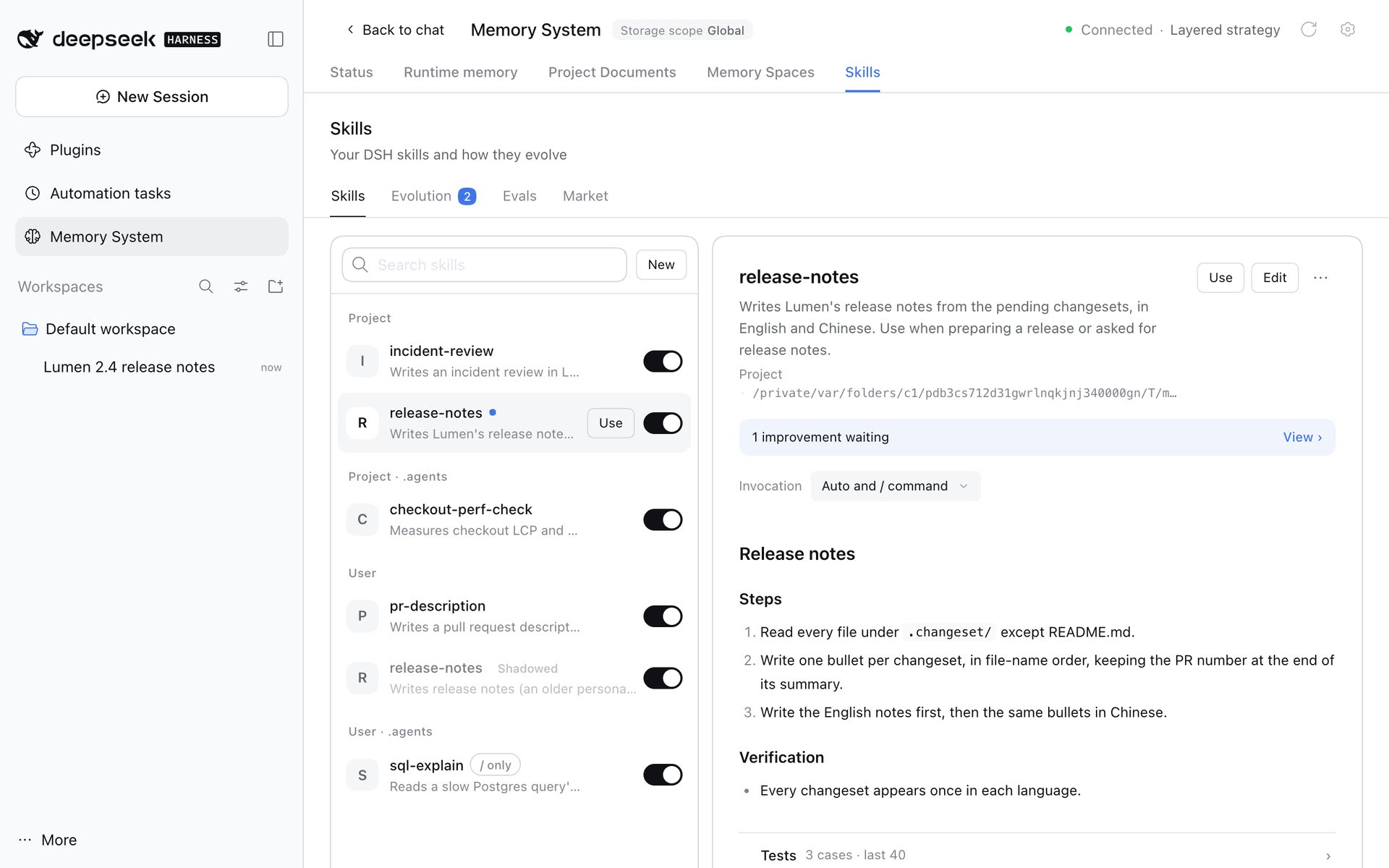
The list groups every SKILL.md DSH can load by where it lives, in DSH's order of precedence: the project's .dsh/skills and .agents/skills, then your ~/.dsh/skills and ~/.agents/skills. When two skills share a name, DSH loads the first, and the other is marked Shadowed. Files DSH would refuse are counted under the list (N files cannot load) and open to their reasons.
- Each row has a switch that turns the skill on or off for both the model and the
/menu, and Use (on hover) that returns to the conversation with/namein its input. A dot means an improvement waits for the skill DSH loads. - New writes a
SKILL.mdfrom a name and a description in the root you choose; the name must be lowercase letters, digits and single hyphens. - The detail shows the rendered
SKILL.mdwith Use, Edit and a menu with Improve (a task Agent writes a draft, optionally from your note) and Remove (the folder moves to the Trash tab). - Invocation is one choice: Auto + /, / only, Auto only or Off. It writes DSH's own
disable-model-invocationanduser-invocablekeys. - Tests is one line with the skill's case count and last score; it opens the skill under Evals. Versions and Files fold away: every change (creation, edit, invocation, install, an adopted improvement, a restore) leaves a version you can compare and restore.
Every write is fenced by the file's hash, so a skill edited elsewhere in the meantime is not overwritten.
SKILL.md writes must fit within 64 KiB (65,536 UTF-8 bytes, including frontmatter). An oversized manual save reports the actual size and leaves the existing file unchanged; it does not call a model or split files automatically. For a bundle, move detailed material into references/ and keep links in SKILL.md. For a flat single .md skill, shorten redundant wording in place while preserving required steps and information.
Trash
Trash lists removed skills with their name, removal time, original location, bundle or single-file layout, and size. Restore returns a known entry to its recorded path, including its original project even when another workspace is selected. Older entries without a known location ask you to choose a root.
When the name is already taken, choose another name, explicitly confirm replacement, or cancel. Replacement checks the current file hash and keeps the displaced skill in the Trash. Renaming updates the skill name while retaining the bundle's other files. The list and count refresh after each operation.
Delete asks you to type the skill name. Empty has its own confirmation. Both permanently remove files; ordinary Remove keeps them recoverable.
Evolution
Reviews see full-file byte sizes and bundle/flat layout alongside the skill catalog, including when a content preview is truncated. Size alone does not bypass the conversation-evidence requirements. Draft generation states the same write limit from the start; an oversized result uses the existing single repair retry to request a shorter SKILL.md plus referenced detail files for bundles, or an in-place edit for flat skills. Draft review, backtesting and adoption rules remain unchanged. A model can still fail to produce a valid draft; no oversized file is written.
The page follows drafts and backtests while they run, refreshes the cards again when they finish, and reloads when you return to the window or tab.
On wide screens, the Pending and Done lists scroll independently of the selected detail. Selecting another item opens its detail at the top while keeping your place in the list. Narrow screens keep the list above the detail.
The global draft model is configured under Default models in Skills settings; Item model at the top of the detail overrides it for one suggestion (Follow default shows the active default model, and the gear beside it opens Default models in Settings). Clearing an override follows the global default, and leaving both unset follows the task Agent. Automatic backtests started by draft generation use the draft's selected model. Choices survive a restart in skills/preferences.json; older versions ignore that optional file.
Pending lists what waits for you: suggestions, and drafts written for a skill directly. Done keeps what was adopted, dismissed, expired or invalidated. Evidence lists the conversations reviews read. The sparkle button, Review now, reviews the current conversation now instead of waiting for it to pause.
Deleting a suggestion removes its links from review records and evidence, while keeping the recorded conversation and test cases. Old records with deleted suggestion links are filtered automatically when read. If a suggestion is deleted while its page is open, the detail shows a deleted notice; other loading failures can be retried.
| A suggestion and its evidence | Its draft, backtested |
|---|---|
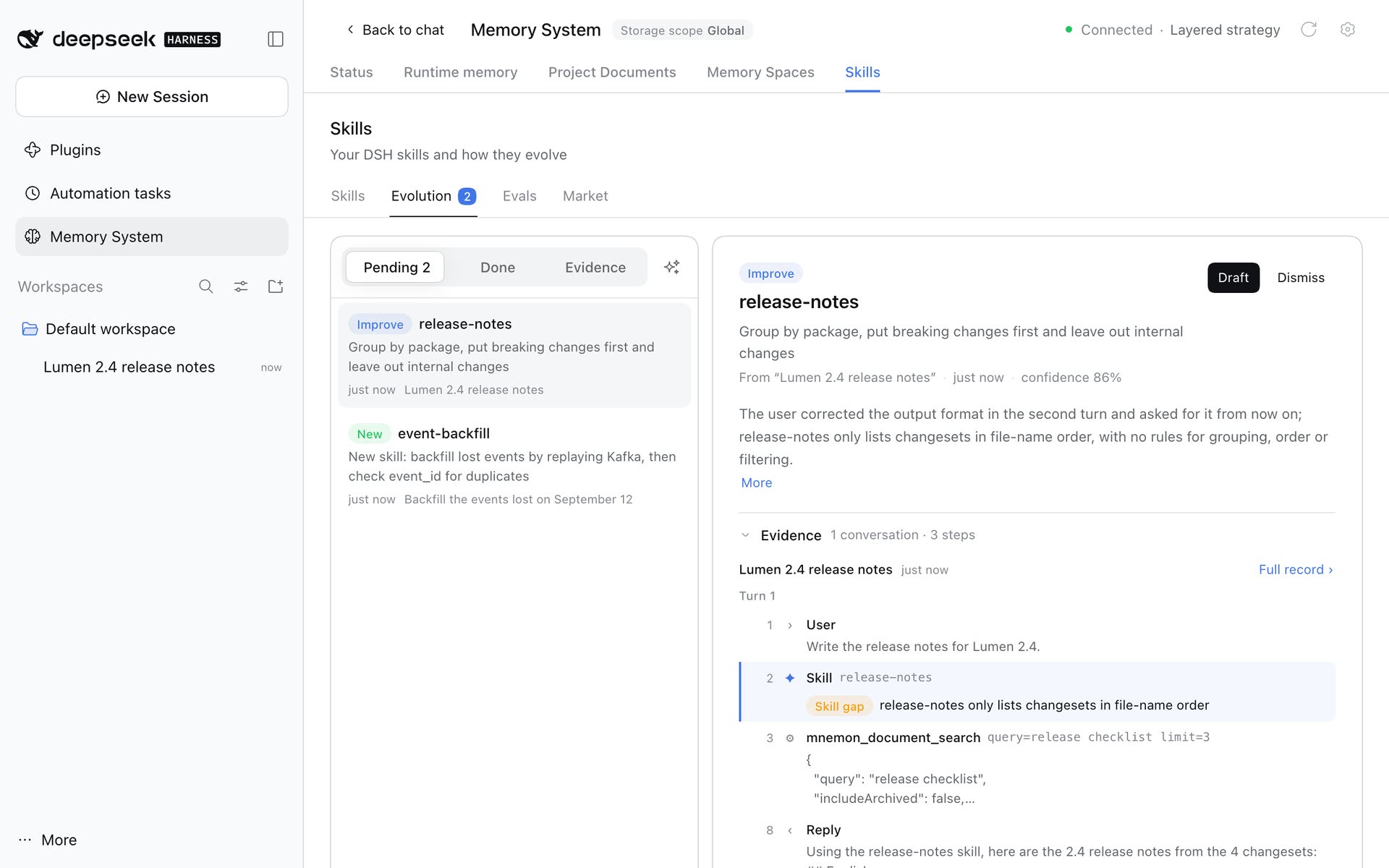 |
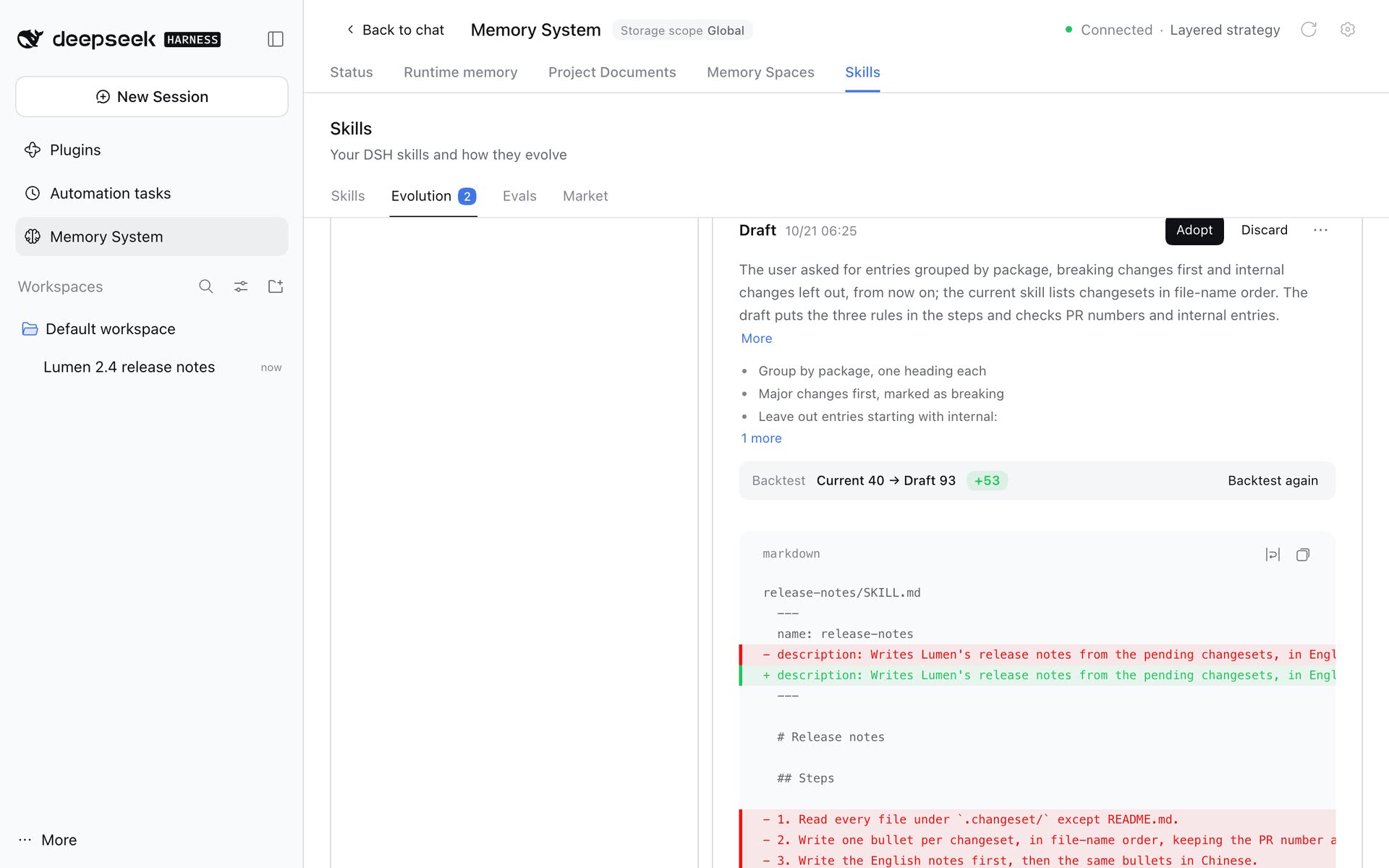 |
- A suggestion says what it proposes, a new skill or an update to one, in one line, with its reason, the conversation it came from and its confidence. Draft asks a task Agent to write the new
SKILL.md; Dismiss sets it aside. Its Evidence folds out the cited steps of the conversation, each linking to the full record. - A draft shows its notes and changes, the backtest as one line, such as Current 40 → Draft 93 +53, which opens to each case's verdicts, and the diff (including any bundle supporting files such as
references/,scripts/, orassets/). Adopt preserves complete supporting-file bytes and permissions in version history separately from the bounded model preview, and replaces each changed file atomically (a new skill goes to your user skills or the project's, as you choose), Discard drops it, and the menu holds Edit draft and Redraft with a note. A draft that scored lower than the current version asks before it is adopted. Flat single-.mdskills keep changes inSKILL.md, and drafts reject newly broken relative bundle links or concurrent edits to supporting files. Backtests include active or drafted supporting files alongsideSKILL.md.
Supporting-file versions preserve binary assets, larger text and executable permissions. Backups cover editable regular files (including files omitted from the model preview); hidden paths, symlinks, dependency/cache directories (node_modules, __pycache__, venv), and paths outside the editing API remain untouched. A bundle above 16 MiB or 1,024 files is refused before supporting-file adoption so no incomplete backup is accepted. Existing text-only versions still restore their recorded text; older preview snapshots do not delete omitted files. Missing or corrupt new byte snapshots stop restoration without changing the skill.
- Evidence shows each conversation as numbered steps (your messages, tool calls with their failures, skill loads) with what the review marked on them. Pin keeps a record from being pruned; choosing steps and Make turns them into test cases for a skill.
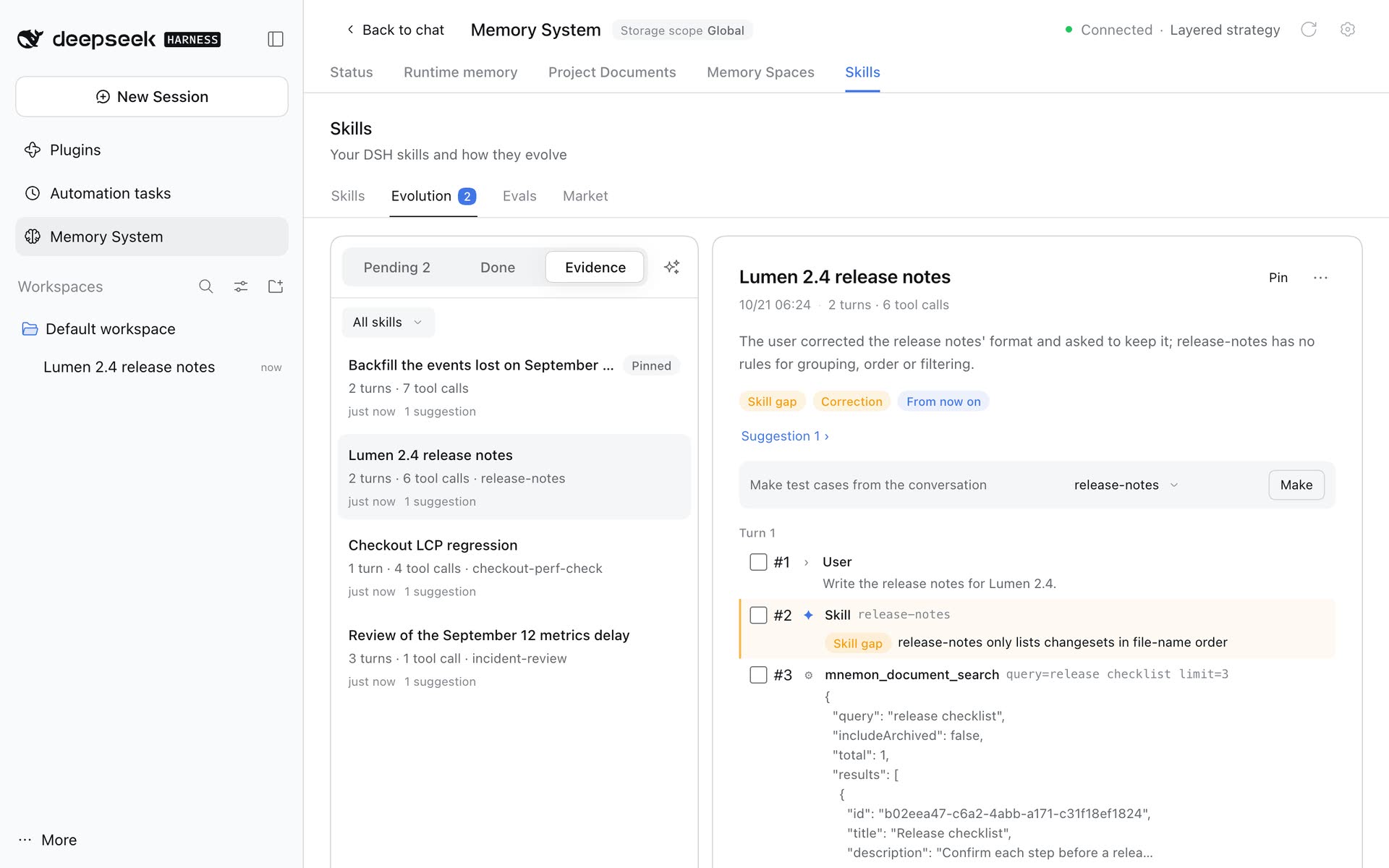
Improvements keep the original file, including its project, when you switch storage scope. Current skill file opens that file in the suggestion; its draft diff, redraft, baseline backtest and adoption use the same origin. Same-name skills in other projects or roots are separate improvements.
Older project suggestions recover their origin from the cited review trajectory when it identifies one workspace. Linked drafts can use that origin too. If the origin is missing or conflicting, select the original workspace, open the skill on Skills, and use Improve to generate a new draft; copy any useful edits from Edit draft first. Existing drafts and evidence stay available. A deleted, moved or unreadable file has a separate notice and cannot be adopted accidentally into another same-name skill.
Optional automatic adoption
Automatically adopt new suggestions (skills.autoAdopt) is off by default. With self-evolution and automatic backtests enabled, it processes only suggestions newly created by an idle review. The existing Create new skills and Improve existing skills switches each remain authoritative. Enabling it does not sweep historical suggestions, manually triggered reviews, or suggestions merely reinforced by another review.
Each suggestion gets a draft and a fresh baseline/candidate pair using the same resolved backtest model, reasoning effort and complete enabled case set. Drafting uses its suggestion/global draft model; evaluation uses its skill/global backtest model, falling back to the task Agent default. Every selected check must be explicitly graded. Errors, interrupted/incomplete runs, image-dependent cases, changed cases or drafts, and missing model routes leave the suggestion for manual review with a visible reason. If enabled cases exceed Cases per backtest, automatic work stops rather than increasing the configured model-work limit or silently omitting cases. Adjust the enabled cases or the limit before future reviews; the current suggestion remains manual.
A candidate must not regress on any case or lose a previously passing check. Regression adds both scores and case results to the rewrite guidance, with at most two rewrites (three drafts total). A remaining regression retains the draft in review. The suggestion's Automatic adoption activity shows the steps, reasons and both scores. The Source rechecks the draft, cases, results and current skill hash under its existing write lock, then uses the normal adoption/version path.
Turning off automatic adoption, automatic backtests, evolution, or the applicable create/update switch stops the affected work at its next checkpoint and prevents adoption. A queued Source write also observes cancellation. Jobs are bounded to 16 in memory, processed sequentially; backtests retain their existing concurrency/deadlines. Restarting does not resume automatic adoption. The persistent candidate quota below survives restarts. Backtests remain text simulations and do not verify real browser, login, installation or other external actions.
Daily candidate budget and reuse guidance
Automatic candidates per day (skills.autoAdoptDailyLimit, default 2, range 0..100) limits new automatic candidates sharing one Skills storage root. Daily quota time zone (skills.autoAdoptTimeZone) accepts an IANA zone such as Asia/Shanghai; local uses the Host time zone. Reservations are made under the Source write lock before any automatic model work. The same skill file is admitted at most once per day. Attempts, cancellations and failed candidates count; up to two rewrites reuse one reservation. Zero pauses automatic processing, without disabling manual drafting, backtests or adoption.
When full, the suggestion stays pending with a visible reason and the date/time zone/count in Automatic adoption activity. Old suggestions are never swept the next morning. The skills/auto-adoption-budget.json ledger survives restarts and suggestion/history deletion; counts are recomputed from timestamps if the time zone changes. It retains 72 hours, covering a calendar day across IANA offset changes. Upgrade seeds recorded recent automatic activity, including retained review records. Records already removed before upgrading cannot be reconstructed. An unreadable budget stops automatic processing and keeps manual actions available. Source versions without reservation support require upgrading before automatic processing; a new Source serving an older Host applies its default quota at the final write. Existing adopted skills are untouched.
Suggestions use deterministic evidence guidance: Reusable workflow requires at least 3 distinct cited windows, 20 distinct cited steps and confidence >= 0.8; One-off candidate has one cited window and fewer than 20 steps. Remaining or missing evidence is Needs judgment and stays visible. A window is a review segment, not necessarily a separate session; both counts are shown. Only admitted references count, duplicate references do not multiply them, and model signals do not decide the group. No additional model call is made for ambiguous cases.
Reusable suggestions appear first. Pending one-off candidates are folded with an explicit expand control; links open the selected suggestion, and drafts already in review remain visible. Guidance is recorded for new or reinforced suggestions and derived for older records on read. It only changes display, never deletes data or grants automatic adoption authority. Automatic adoption remains opt-in and continues its existing evidence and permission checks.
Evals
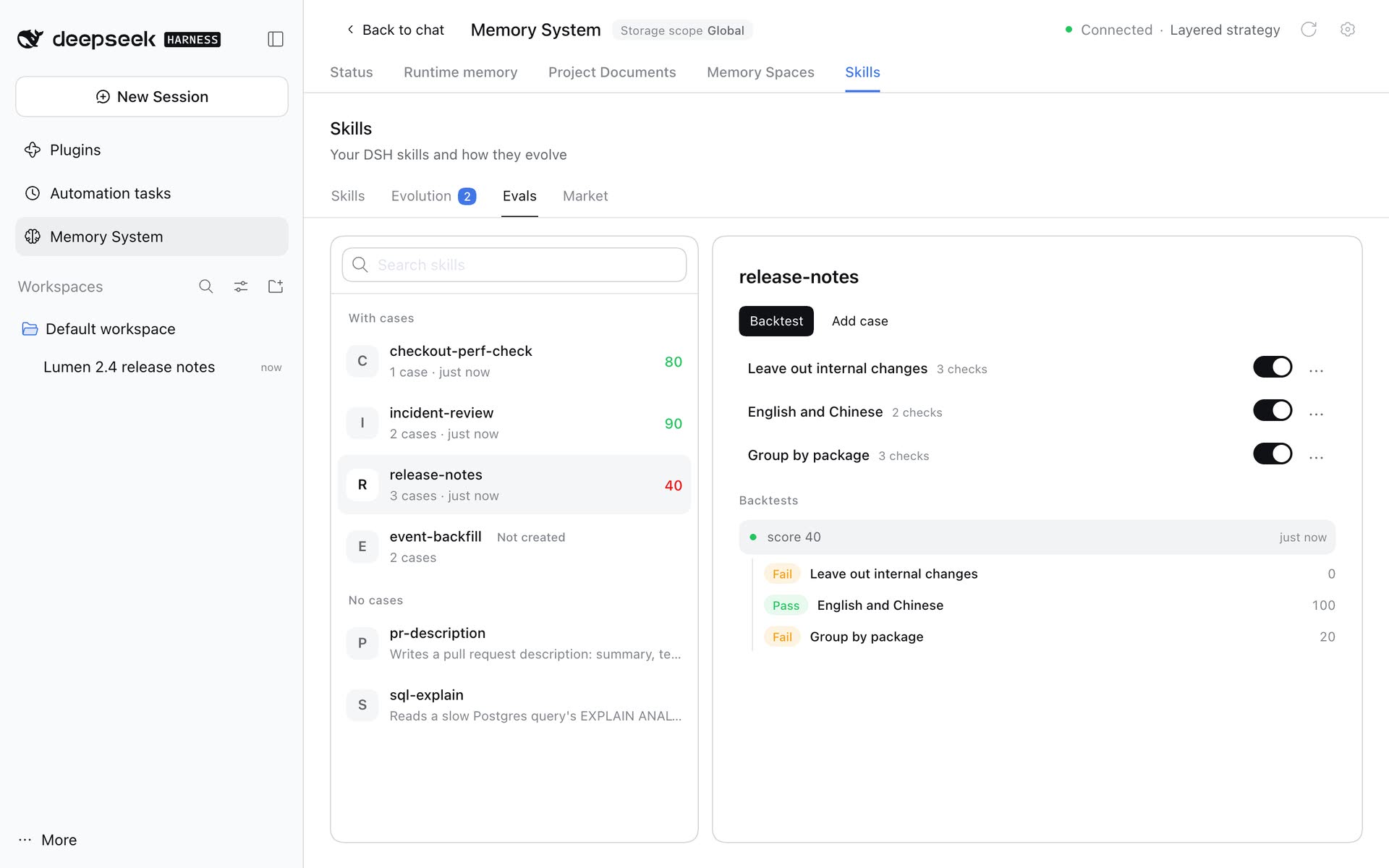
Every skill's tests in one place. The list shows the skills with cases first, each with its last score against the version DSH loads, then the skills without cases, then the skills a suggestion proposes that do not exist yet (Not created), which link to their suggestion.
The global backtest model is configured under Default models in Skills settings, and Item model at the top of the detail saves a per-skill override (with a gear shortcut to Default models). Manual backtests, including a draft's comparison with its baseline, use the skill override, then the global backtest default, then the task Agent. The executor and judge use the same selected model.
- Add case takes a title, the task as the user would say it, optional context, and checks, each Must or Should. Cases also come from reviews and from evidence. Each case has a switch, and opens to its checks and the conversation it came from.
- Backtest runs the enabled cases against the current version, or without the skill when it does not exist yet. The history keeps the newest runs, each opening to its per-case verdicts, the steps the run took and its answer.
A backtest is a simulation: an executor follows the skill without tools and writes what it would do, and a judge grades each check. A case passes when every Must check passes, and the score counts Must checks twice. A case that could not run counts in neither score of a comparison.
For a case that needs a screenshot, scan or chart, select Requires image input when adding or editing it. Text-only backtests cannot receive images: the marked case shows Not measured, makes no executor or judge calls, and is excluded from the run's score and the draft/baseline comparison. If every selected case is marked, the run completes without a score. This is an explicit marker, not automatic image detection or attachment support.
Existing cases remain text-only and previous runs are unchanged; mark image-dependent cases and backtest again. To test a text transcription instead, put it in Context and clear the marker. Before downgrading to a Host without this support, turn off marked cases so the older Host does not try to simulate them.
Market
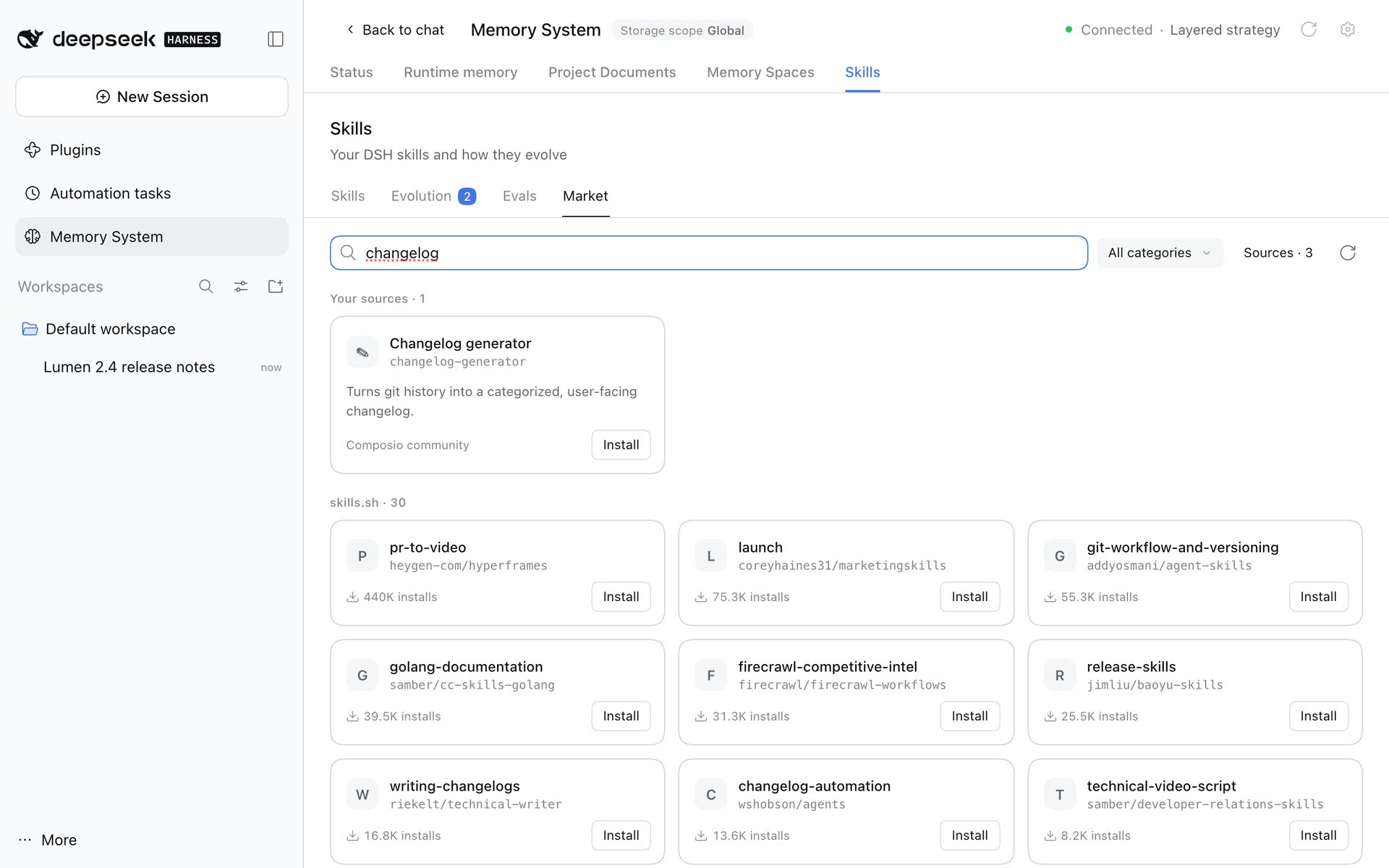
The market reads skills from sources, each one way skills are already published:
| Source | What it offers |
|---|---|
| Featured (built in) | A curated list with descriptions in both languages; each skill installs from its upstream repository under the upstream license |
| skills.sh (built in) | The open index the skills CLI searches, hundreds of thousands of skills, queried once you type two characters and ordered by installs |
| GitHub repository | Every SKILL.md in a repository or one folder of it, Claude Code plugin marketplaces included |
| Website | Skills a site publishes in an Agent Skills discovery index at /.well-known/agent-skills/ |
| Catalog | A JSON file in the market's own format, by URL or path: a team's curated list, with categories and both languages |
- Search filters your sources and, below them, shows what skills.sh found, each with its repository and install count.
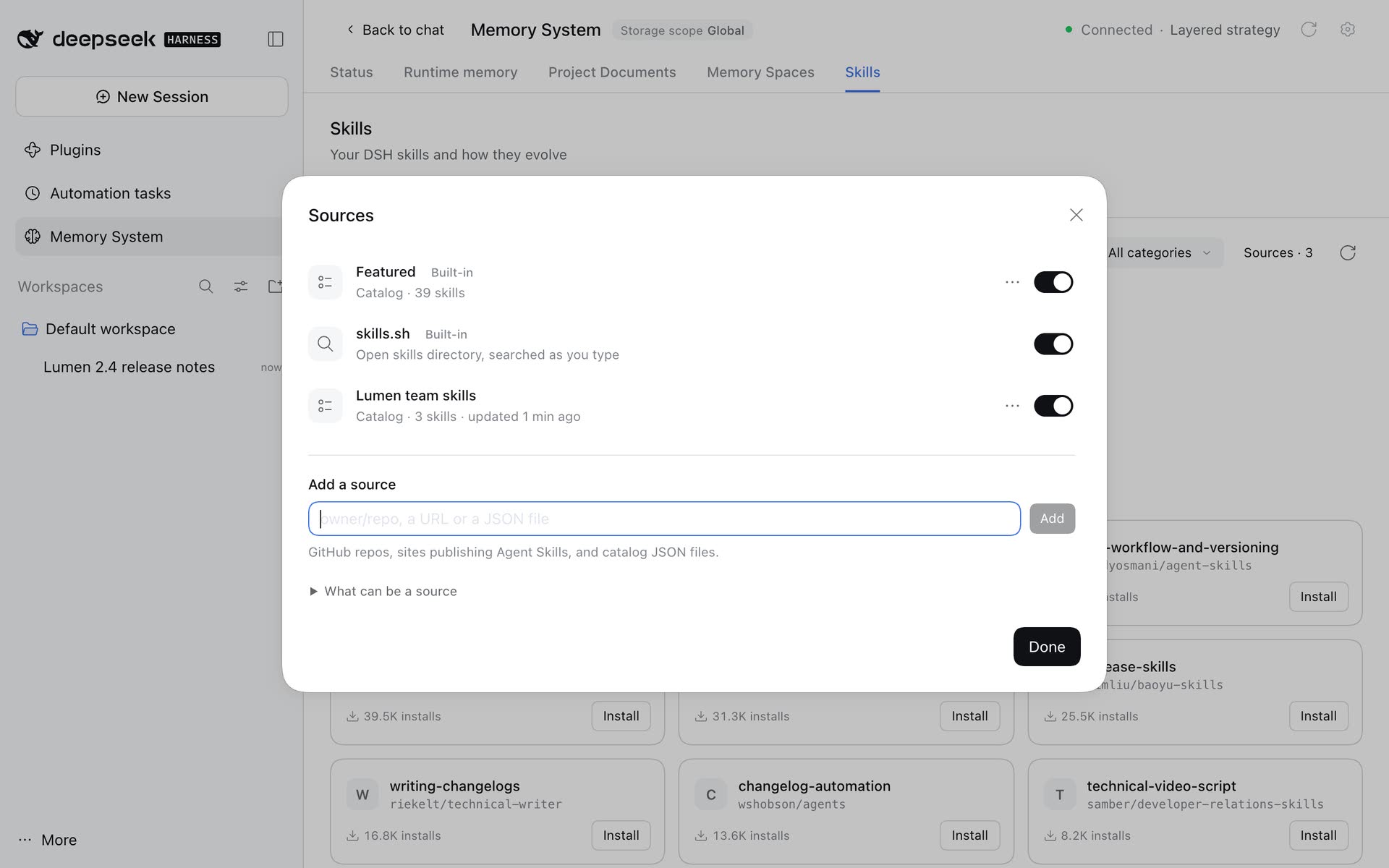
- Sources opens the Market sources section in Skills settings (or the Sources dialog when mounted standalone), listing each source with its kind, skill count and status or error, a switch, Refresh, Remove, and Add a source for
owner/repo, a github.com or skills.sh link, a site's address, or a JSON file's URL or path. Pasting any of those into the Market search box also offers to add it in one click. - Preview shows the
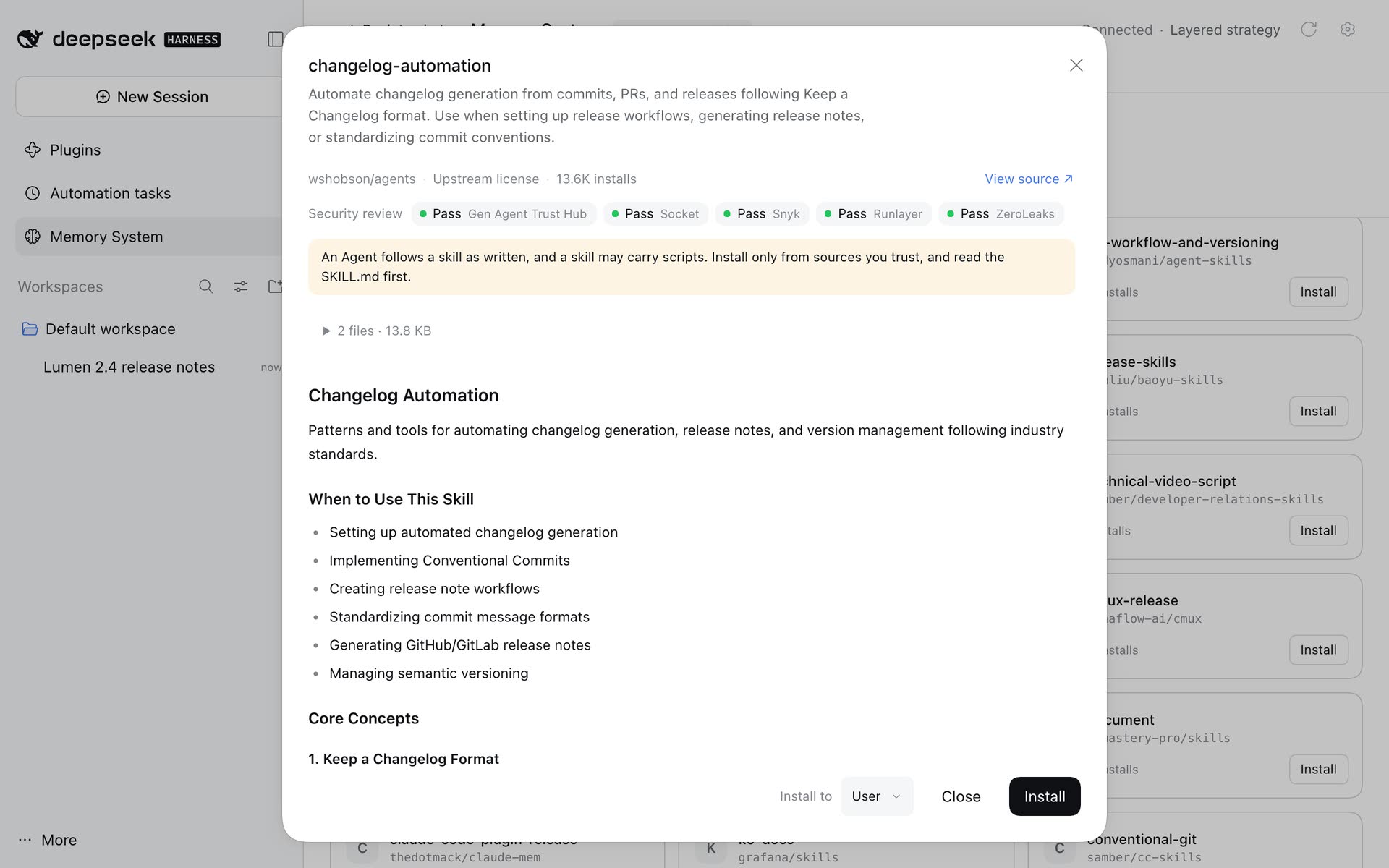
SKILL.md, its files, license and source, and for a skill skills.sh reviewed, the Security review of each reviewer (pass, warning or fail, worst first). - Install writes the skill to the root you choose. Files come from the skill's own repository or site, complete, bounded in size and number, with every path kept inside the skill folder; a site's artifact must match its published SHA-256 digest. The install is recorded, so the market can offer an update, and it says when a local edit would be replaced.
| A preview with its security reviews | Sources |
|---|---|
 |
 |
An Agent follows a skill as written, and a skill may carry scripts. Install only what you trust, and read the SKILL.md first.
Self-evolution
Self-evolution is off until you turn it on under Settings, or from the empty Evolution tab. Then:
- As each turn ends, the Host records the turn's steps: your messages, the tools it called and whether they failed, and the skills it loaded. Secrets such as tokens and API keys are redacted.
- The conversation earns a review as it goes: one point a turn, more for longer requests (up to 3), many tool calls (up to 2) and varied tools (up to 2). Once the window reaches the Review threshold, the conversation has been idle for Idle wait seconds, and at least Review interval seconds have passed since its last review, a task Agent reviews it in the background. A new turn postpones the review to the next pause.
- The review looks for strong signals (corrections, "from now on" instructions, failed tools, a change of approach, a reusable procedure, a skill that was missing or misleading, an approach the user confirmed) and suggests a new skill or an update, citing the steps it rests on. It can propose test cases too. Before choosing a new name, it receives the existing skill catalog and up to 20 recently updated open suggestions, with bounded summaries and rationale. It is instructed to reuse a matching skill or suggestion and retain earlier requirements when combining refinements; matching remains a model judgment, not automatic semantic clustering.
- Suggestions are admitted only above the Minimum confidence. One per skill file and kind stays open (new-skill proposals use the name): new evidence is appended, and a pending suggestion of equal or higher confidence can replace its summary and rationale; drafting/review wording stays fixed; a dismissed suggestion is not proposed again from the same conversation for a day; each conversation keeps at most Pending per conversation; and suggestions expire after Suggestion expiry days. An update records the skill's hash and is invalidated if the file changes before it is drafted.
- Draft writes the new
SKILL.md. With Backtest drafts on, the draft and the current version (or no skill, for a new one) run the same cases, at most Cases per backtest, and the draft shows the comparison. - You adopt, edit, redraft or discard it. Manual Adopt remains the default. The optional automatic-adoption flow above can process new idle-review suggestions.
Suggest new skills and Suggest skill improvements can be switched independently. Both are on by default; turn off the first to review only improvements to existing skills, or the second to review only new skills. The Source checks each suggestion against the current skill catalog, so a proposed "new" skill with an existing name still counts as an improvement. Disabled types and their proposed test cases are not saved, including when you turn a type off while a review is running. Turning both off pauses automatic and manual conversation reviews without starting a model call. Earlier suggestions remain available for manual drafting, testing and adoption.
A review that fails is logged under the turn and keeps its window; after three failures in a row, the conversation stops reviewing until DSH recreates its Agent. Reviews, drafts and backtests run as dsh-mnemon task Agents, on the model the Task Agent model setting picks; see Configuration.
In a conversation
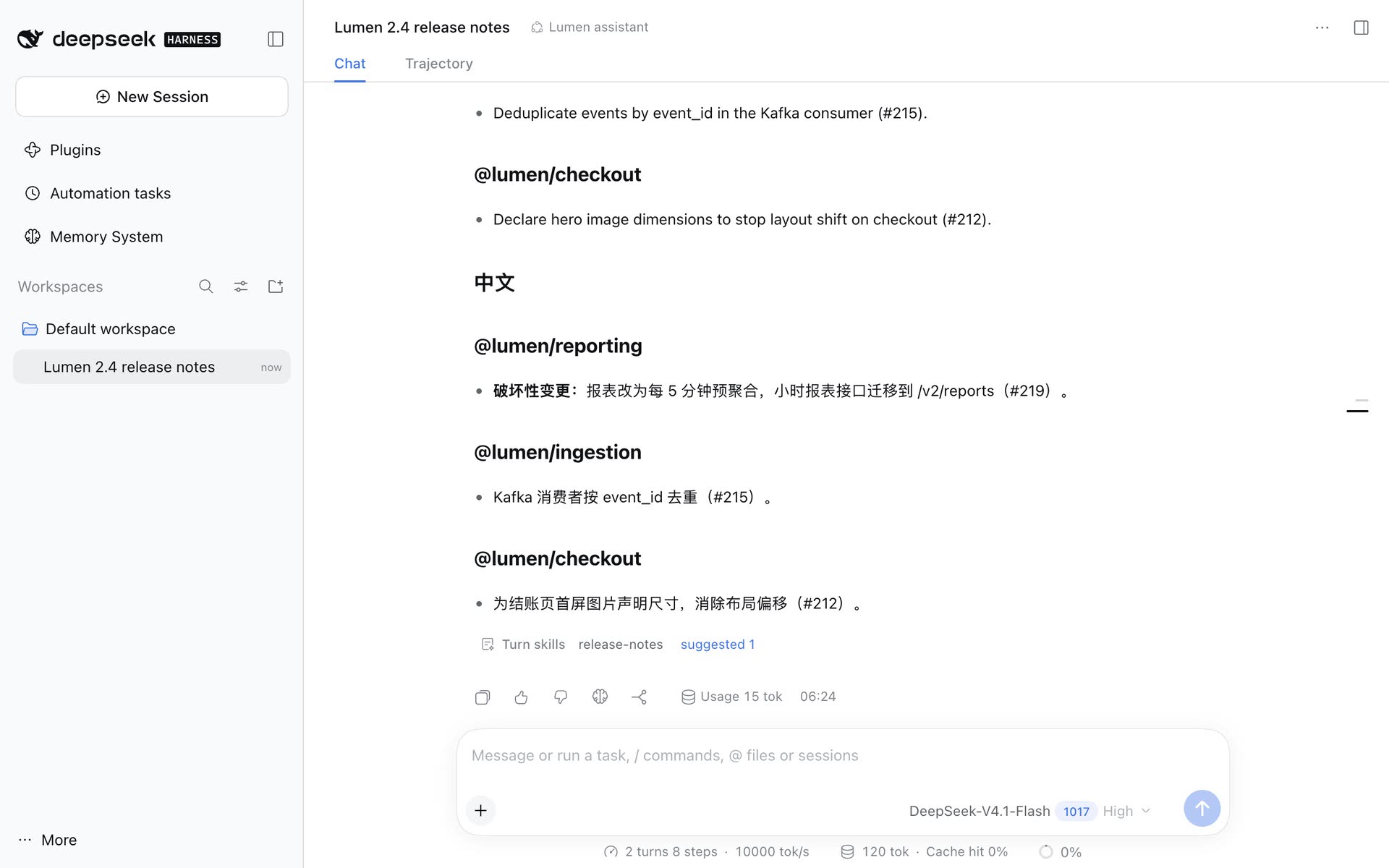
A turn that used a skill, or earned a review, ends with a Turn skills line. It names the skills the turn used, loaded by the model or called by you as /name, then shows Reviewing while the review waits or runs, and suggested with a count once it has left suggestions. Each skill opens on the Skills page; the suggestions open the suggestion, or the Pending list when there are several. The line also shows in a conversation reopened from history, and it is hidden when the turn has nothing to say. Turn it off with In the conversation.
Its own sidebar entry
With Sidebar entry on, Skills becomes a sidebar entry of its own, next to the Memory System, and the Memory System leaves its tab out. The page is the same, under its own title; its gear opens its settings, Back to chat and Use return to the conversation, and the links under a turn open it there.
Settings
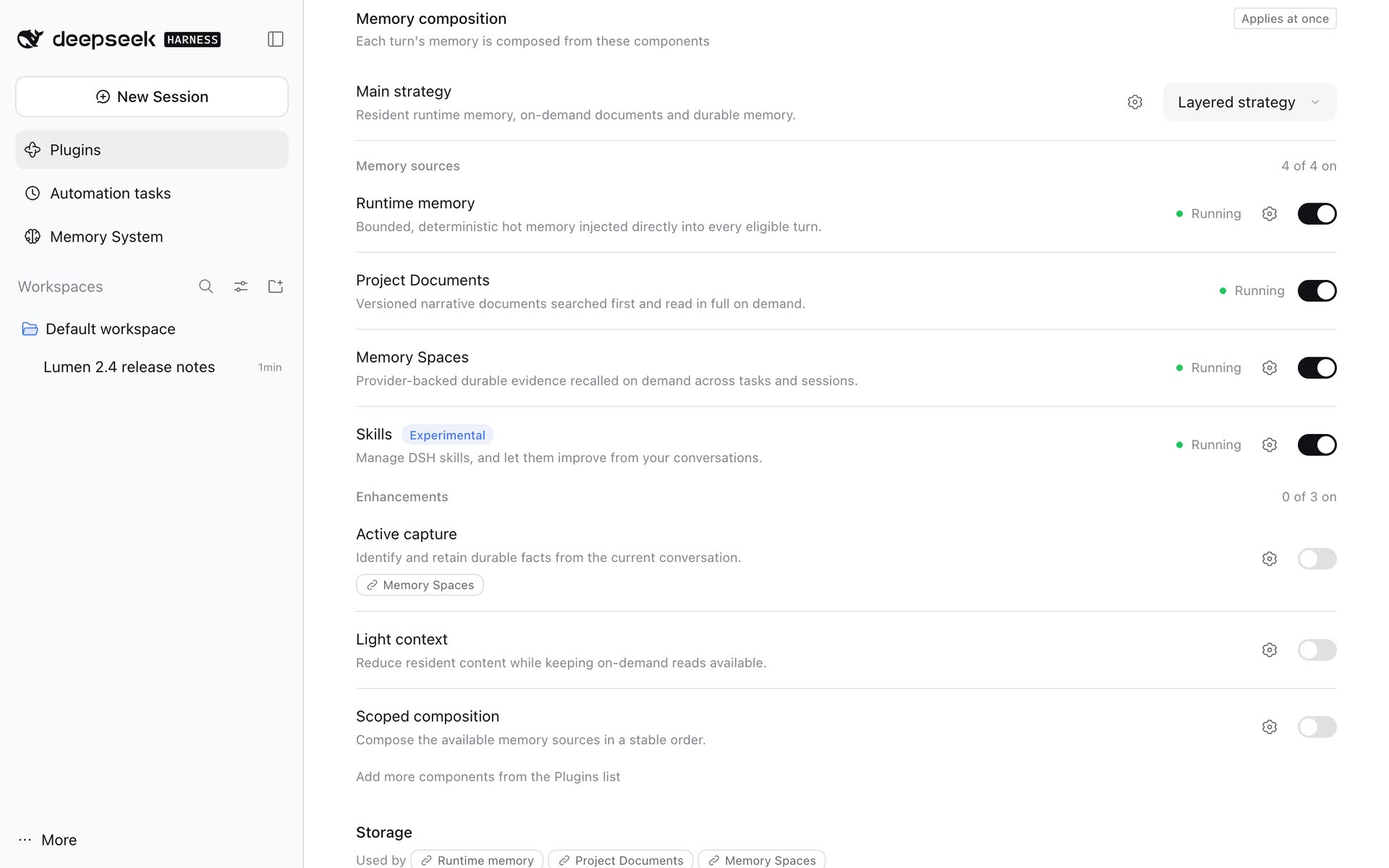
| dsh-mnemon's page under Plugins | Skills' own page |
|---|---|
 |
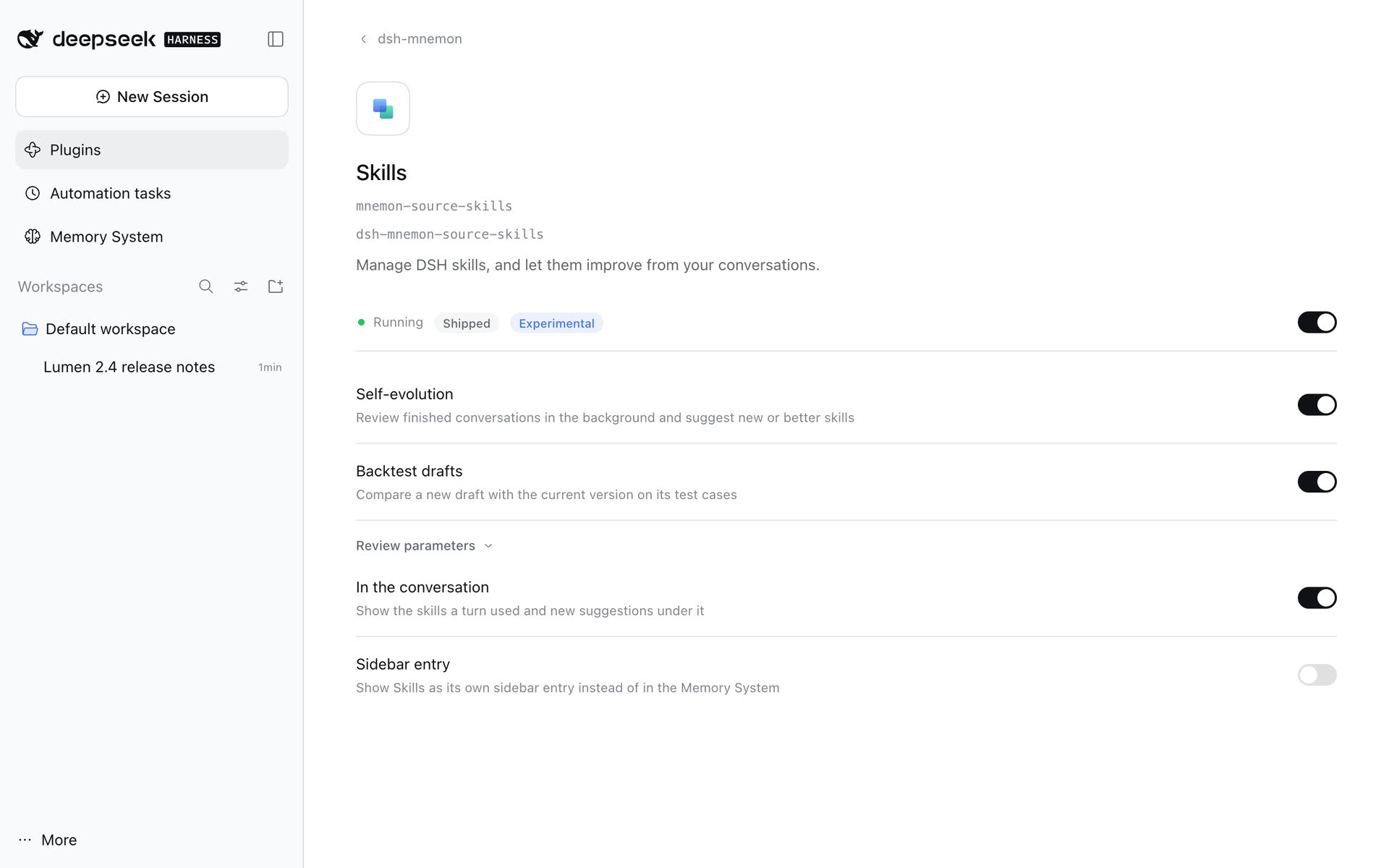 |
Skills has its own page under Plugins → dsh-mnemon, like every component, and its row there carries the Experimental tag. Switches apply at once, without reloading the plugin.
| Setting | Default | What it does |
|---|---|---|
| Self-evolution | Off | Review conversations and suggest skills. Task and subagent sessions are saved locally; Mnemon does not automatically delete them. |
| Suggest new skills | On | Allow reviews to propose skills that do not exist yet |
| Suggest skill improvements | On | Allow reviews to improve existing skills; reviews pause when both suggestion types are off |
| New skill destination | User | Choose User, Project or Follow storage; saved with Apply, reset with Discard. Existing skill improvements keep their original file |
| Backtest drafts | On | Compare each new draft with the current version on its test cases |
| Automatically adopt new suggestions | Off | Draft and adopt only new idle-review suggestions with complete non-regressing backtests; up to two rewrites |
| Draft generation | 32,768 / 65,536 tokens | First attempt / one larger retry after truncation; saved with Apply and available with self-evolution off |
| Default models | Follow task Agent | Global default models for draft generation and backtesting; apply at once |
| Skill directories | ~/.dsh / ~/.agents |
Custom user-level DSH and .agents home roots, with directory chooser support; saved with Apply |
| Market sources | Built-in Featured + skills.sh | Enable, refresh, remove or add skill market registries in one place |
| Review parameters | — | The thresholds above, folded, applied together with Apply |
| In the conversation | On | Show the Turn skills line under each turn |
| Sidebar entry | Off | Show Skills as its own sidebar entry instead of in the Memory System |
Under Draft generation, set Draft output token limit and Retry output token limit to budgets your model provider supports, including reasoning and the complete SKILL.md. They are separate so retries never silently double your chosen limit. A retry limit equal to or below the first disables the truncation retry. There are at most two attempts, shared with the existing file-validation repair. Truncated output is discarded; only a complete, validated draft is saved, and the installed skill changes only after adoption. If generation fails, the error gives the attempted budgets and source file size. Lower a budget rejected by your provider; for a file that still cannot fit, shorten the skill or choose a model with a larger output limit. See Skills settings for the exact keys and ranges.
skills.targetScope defaults to user to preserve existing installations: upgrading or changing storage scope does not move new skill writes to another root. Choose storage explicitly to follow storage scope. New suggestions record their resolved destination; drafts and redrafts keep that destination, and adoption uses the draft unless you explicitly choose another root. Suggestions from older versions without a destination use the current setting when drafted; existing drafts retain their recorded root. Improvements always write back to the original file identified by baseKey and its recorded origin, including the owning project, regardless of this setting, the selected storage scope or a destination override.
Project roots come from the Skills Source catalog for the selected workspace, following DSH discovery (nearest .git ancestor, or the workspace itself); the model task's working directory is not used. A missing workspace/project or an unwritable destination produces a visible review/draft error. Mnemon does not silently fall back to user skills. Adoption checks the final selected project again: a project removed after drafting is not recreated, and you can explicitly select a user root instead. Later filesystem failures are also reported. No skills are migrated, discovery precedence is unchanged, and adoption remains manual unless you explicitly enable automatic adoption for new idle-review suggestions.
The configuration reference lists every key, its range and where it is saved.
Data and trust
- Skills stay where DSH reads them. Edits, installs and adoptions write the skill folders themselves. A deleted or replaced skill goes to the Skills trash first.
- Skills' own data lives in the
skills/folder of the storage root: the ledger of suggestions, drafts and installs, the test cases and runs, the recorded conversations, every skill version, and the market's sources with their cached lists. See the storage model. It is not part of ZIP backups or Git sync. - Recorded conversations keep what a review needs to cite (your messages, tool names, inputs and failures, skill loads) with secrets redacted. The newest 100 are kept; pinned records and those a suggestion or case cites stay longest. You can delete any record.
- Task and subagent sessions are saved by DSH in its own session directory (by default
~/.dsh/sessions/; the actual path depends on DSH configuration), separately from theskills/evidence above. A review involves a task Agent and a delegated worker. Disposing those instances, hiding them from the sidebar or deleting Skills evidence does not automatically remove their DSH sessions. Mnemon currently has no session cleanup control or automatic retention period; these sessions are also outside Mnemon ZIP backups and Git sync. Turning Self-evolution off stops future automatic reviews without deleting earlier sessions; manual drafts, backtests and other model operations can still create sessions. - Model use. Only self-evolution, drafts, backtests and making cases from evidence call a model, as task Agents. Browsing, editing, switching and installing do not.
- The market fetches from GitHub, skills.sh and the sites you add. GitHub allows 60 unauthenticated requests an hour; listing a repository takes one, reused for ten minutes. Set
GITHUB_TOKENorGH_TOKENin DSH's environment to raise the limit.
Troubleshooting
| What you see | What to do |
|---|---|
| Evolution stays empty | Check that Self-evolution and at least one suggestion type are on. A conversation needs a few turns of real work and a pause before its first review; use Review now to review it now. |
| Review failed under a turn | The task Agent could not answer; the window is kept for the next try. After three failures, the conversation stops reviewing until DSH recreates its Agent. |
| GitHub declined to list … | The hourly limit is spent. Try again later, or set GITHUB_TOKEN. A skills.sh preview still shows the skill from its text copy, and says so. |
| skills.sh is busy or can't search right now | Search again in a moment; your other sources still work. The switch under Sources turns skills.sh off. |
| … publishes no Agent Skills index | The site has no /.well-known/agent-skills/index.json under the address or at its root. |
| A draft says The backtests cannot be compared | No case could run on both sides; check the per-case errors, then Backtest again. |
Recovering a draft or backtest
Draft generation stops after 15 minutes; backtests after 45 minutes. At most two backtests run at once (each with at most two cases executing concurrently), with a bounded queue of at most 16 active or waiting runs. Waiting runs can also be cancelled and count toward the deadline. A hung task returns to a retryable state even if its model ignores cancellation. Cancel backtests on the draft card; cancellation keeps the draft, cases and partial results. Review the draft before manually adopting without a completed comparison.
If the original skill changed or a creation now has a same-name target, the card explains the conflict and offers Redraft & test. This reads the latest skill while preserving prior guidance. Editing an old draft does not bypass its file hash check. A file changed during generation is rejected before the old draft is replaced. Expired running records are persisted as interrupted at Source startup and by its minute reaper; late results cannot revive them.