13 KiB
English · 简体中文
dsh-better-workspace-group
A workspace grouping plugin for DeepSeek Harness. Built on z-col/dsh-workspace-groups, it keeps workspaces, folders, and sessions easier to organize and use from the sidebar.
Merged bundle: workspace-groups-remote
This tree merges two DSH plugins into one installable bundle (package workspace-groups-remote):
- workspace-groups (this repository's original content): the sidebar grouping manager and session tab strip. Its host half builds from
src/tolib/groups.js; its client half lives insrc/client/groups-client.ts. - @zhangfengshun/dsh-remote-ssh 2.4.45 (MIT, © ZhangFengshun): vendored verbatim under
vendor/dsh-remote-ssh/. Its host half ships unbundled aslib/remote-ssh/index.js— it must resolve@deepseek-ai/schemasteryfrom the host's module table, because its Config schema relies on the DSH-branch schemastery.volatile()marker. The shipped host artifact carries a small local patch set, applied at build time byscripts/patch-remote-ssh.mjswith the vendor tree kept pristine (see "Duplicate remote folders" and "Security hardening" below). Its client ships upstream as a self-registering module-loader bundle;scripts/build-remote-ssh-client.mjsextracts the bare factory at build time and the merged client entry (src/client/index.ts) applies it next to the groups client.
Duplicate remote folders — fixed in this bundle
Upstream's createRemoteWorkspace matched existing records by the raw remotePath string, so the same remote directory spelled two ways (~/proj vs /home/u/proj vs proj/) registered a second workspace record, local mirror and native workspace — visible as two folder rows for one remote project. This bundle fixes it in two layers:
- Host (build-time patch,
scripts/patch-remote-ssh.mjs): registration compares light-normalized spellings first; on a miss it resolves the path once over SSH (pwd -P+$HOME) and compares canonical forms, storing the canonical spelling. Resolution failures are fail-open (creation proceeds as upstream). Behavior is covered bynpm run test:patch; the vendored tree stays pristine, so upstream updates still drop in. - Client (groups): adding a cloud folder also refuses when an existing member is backed by the same workspace, or names the same connection + remote directory, regardless of mirror paths.
Already-duplicated projects are not merged automatically (sessions belong to their workspace). Detaching a member keeps its backing workspace. Deleting the duplicate remote record requires the separate explicit “Delete workspace too” choice; review the affected entry before using it.
Security hardening (also in the patch set)
Fixes from a 2026-11-11 audit, all applied by the same build-time patch script (behavior covered by npm run test:patch, including end-to-end runs of the generated terminal wrapper):
- ssh option injection: every internal connection is built by
sshArgv, which now inserts--before theuser@hosttarget, so a user/host value starting with-(e.g.-oProxyCommand=..., reachable via the remote_ssh tools' inline arguments) can no longer be parsed as an ssh option and execute local commands. The terminal wrapper's own argv gets the same--. - POSIX password handling:
sshpass -p(password visible in the process list to every local user) becomessshpass -e, with the password passed via theSSHPASSenvironment variable — matching the Windows env-based path. - Terminal wrapper trust: the generated
dsh-remote-shellpreviously honored a.remote-ssh.jsonin ANY directory with host-key checking fully off. It now only honors the marker when the cwd is a registered mirror root (a direct child of~/.dsh/remote-workspaces, exactly where the host writes it), usesStrictHostKeyChecking=accept-new, and passesremotePathto the remote shell base64-encoded so quotes/$()in a directory name stay inert data. - Remote path escape:
localToRemotenow folds./..segments lexically and refuses a path whose..would climb above the mirror root, instead of mapping fs requests outside the remote workspace root. - Write-back guard fails closed: if the workspace settings cannot be read, the write-back push is skipped (and surfaced through the
writeBackFailurechannel) instead of pushing with thewriteBack/writeBackExcludeguard never evaluated.
lib/index.js (source: bundle/index.js) is composition only — it applies both plugins on one fiber. cordis.patch.yml inserts a single row for this package and carries remote-ssh's better-sidebar / terminal-controller shell overrides over verbatim.
Remote-SSH settings page (1.3.0)
The settings page is a maintainable source component in this repository (src/client/rssh-settings/). At build time scripts/build-remote-ssh-client.mjs replaces the vendored compiled settings section with it through anchor assertions, so the vendor tree stays pristine. The page has four regions — My connections / Add connection / Remote workspaces / Advanced settings. Remote workspaces and Advanced settings start collapsed; collapsing only changes visibility, never clears drafts or triggers a save, and the collapsed Advanced region shows no inner save button.
- My connections: each card tests independently (success, connected-with-warning, failure and diagnostics are shown separately); delete asks for confirmation in-card, naming the connection and its effect.
- Add connection: every field and conditional display is kept (key auth shows the private key path; password auth shows a masked input and hides the key path); an invalid port is rejected with a clear error instead of silently falling back to 22; ProxyJump lives in the collapsed “More connection options”.
- Import from the system SSH config: a multi-select dialog that checks every save result, counts real successes/failures separately, and can retry failed entries only (successful ones are never resubmitted).
- Remote workspaces: per-workspace write-back, write-back exclude, sync scope, sync exclude and size cap (GiB), saved by workspace id; pull/push are blocked with a “save first” notice while a draft is unsaved.
- Advanced settings: terminal node path, write-back policy and new-workspace sync defaults; read and written separately from per-workspace settings, so neither overwrites the other.
New copy uses its own dsh-remote-ssh-settings locale namespace (Chinese + English); CSS is scoped under .rsui-root and does not leak into other plugins.
Install / migrate
- Remove the two old bundles from the profile (
workspace-groups-localand@zhangfengshun/dsh-remote-ssh). - Add this package instead and fully restart DSH.
Stored data is untouched by the merge: ~/.dsh/workspace-groups.yaml and the $DSH_HOME sidecars, the dsh-remote-ssh settings namespace, and ~/.dsh/remote-ssh/ all keep working. If you ever set remote-ssh options in its old bundle row, they now nest: config: { remoteSsh: { ... } } (connection profiles live in DSH settings either way).
Verify
npm install
npm run build
npm run verify:bundle   # composition checks over the built artifacts, incl. vendor integrity + an executable client smoke
npm run verify          # everything: tsc + vitest + verify:bundle + patch behavior tests
The vendored upstream suite also runs in place once its dependencies resolve — from the repo root: ln -s ../../node_modules vendor/dsh-remote-ssh/node_modules, then node tests/run-all.mjs inside vendor/dsh-remote-ssh. Known pre-existing failures off Windows: 6 groups folders tests use C:\ paths, and a few remote-ssh suites assume WSL / Windows path semantics; both fail identically in the unmerged upstreams.
Known trade-offs
- Load coupling: the two halves load as one bundle, so if either half ever fails to import, the whole package fails — grouping included. That is the price of the single install entry; splitting failure domains would need the host to support lazy per-half loading, which it does not promise today.
- Shell overrides apply to every install: the bundle carries remote-ssh's
better-sidebar/terminal-controllershell overrides, so installing this package also replaces the profile's terminal shell integration (that is what makes mirror terminals auto-connect). What the host's patch engine does when an override target is absent from a future host version is not verified — it is on the real-machine checklist. - First connection to a new SSH host is not fingerprint-confirmed (
accept-new, the same default as VS Code Remote-SSH): the internal channel trusts a host key on first sight and fails loudly if it changes afterwards. The terminal wrapper was raised fromnoto the sameaccept-newlevel by the patch set.
Maintenance
The vendored code is not a fork: to update remote-ssh, replace vendor/dsh-remote-ssh/ with the new upstream tree, run npm run vendor:manifest to re-record its sha256 manifest, and rebuild — the client transform asserts its anchors and fails loudly if upstream changes its bundle wrapper shape. The settings-face replacement is anchor-asserted as well: if upstream changes the settings section structure, the build fails instead of silently keeping the old page. Local changes outside the vendor tree: src/client/GroupsBrowser.tsx narrows a possibly-null ref explicitly (pending !== null && ...) because the fork's tsc types step rejected the optional-chain form (semantics unchanged), and the duplicate-folder guards described above (src/core/folders.ts, addRemoteFolderTo). The host patch script likewise asserts its anchors and fails loudly if upstream changes the anchored code.
Preview
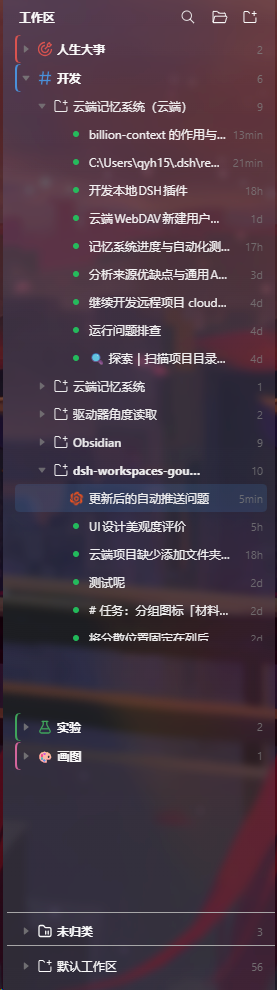
Implemented features
- Workspace groups: browse by group → project → session, with group creation, renaming, deletion, folding, and pinning.
- Drag-and-drop organization: move projects into or out of groups and reorder groups and projects.
- Group appearance: set group colors and icons, including a new Materials & Lab section for lab work, material structures, characterization, and functional devices.
- Multiple folders per project: attach extra folders, choose the default root, and place sessions under the folder that matches their working directory.
- Local and remote directories: create folders in local workspaces and registered SSH remote workspaces without falling back to a local mirror when a remote operation fails.
- Session tabs: open, switch, pin, rename, reorder, and close tabs, including closing other tabs or tabs to the right.
- Sidebar refinements: keep the default workspace pinned at the bottom, align row metadata and actions consistently, and scroll long appearance dialogs.
- Search and persistence: search sessions without losing their group context and keep groups, ordering, tabs, and folder settings across refreshes and restarts.
Install
For the Desktop profile:
dsh plugin --profile desktop add github:newbieQQ/dsh-better-workspace-group
For Web, replace desktop with web. Fully restart DSH or the corresponding Web profile after installation.
Basic use
- Click New Group in the workspace header, then drag projects into it.
- Use the
⋯menu on a project or group to manage grouping, appearance, and folders. - Open Folders… on a project to attach folders or choose its default root.
Add a linked-folder workspace creates a separate entry after confirmation. Existing workspaces and sessions stay in place; it does not migrate sessions or remove old entries. If registration fails after the directory is created, the error identifies that directory; retrying with the same name and folders reuses its verified links.
Detaching a member folder keeps its backing workspace and sessions, so that workspace can appear independently again, even when empty. Both the sidebar and folder dialog ask for this decision. No automatic cleanup is inferred from an empty sidebar count: existing records do not reliably distinguish plugin-created members from independently registered workspaces. Remote record deletion remains a separate explicit choice; it attempts to clean up an unshared local mirror and registration, while session files and the original server directory remain.
For automatic grouping by path or name, see workspace-groups.example.yaml and configure ~/.dsh/workspace-groups.yaml. Manual grouping works without this file.
Uninstall
dsh plugin --profile desktop remove workspace-groups-local
Credit and license
The original project was created by zcol under the MIT License. This fork adds Materials & Lab icons, the bottom default-workspace bar, consistent row actions, remote-workspace folders, and other refinements.
Original work © 2026 zcol; modifications © 2026 newbieQQ. See LICENSE and NOTICE.md.